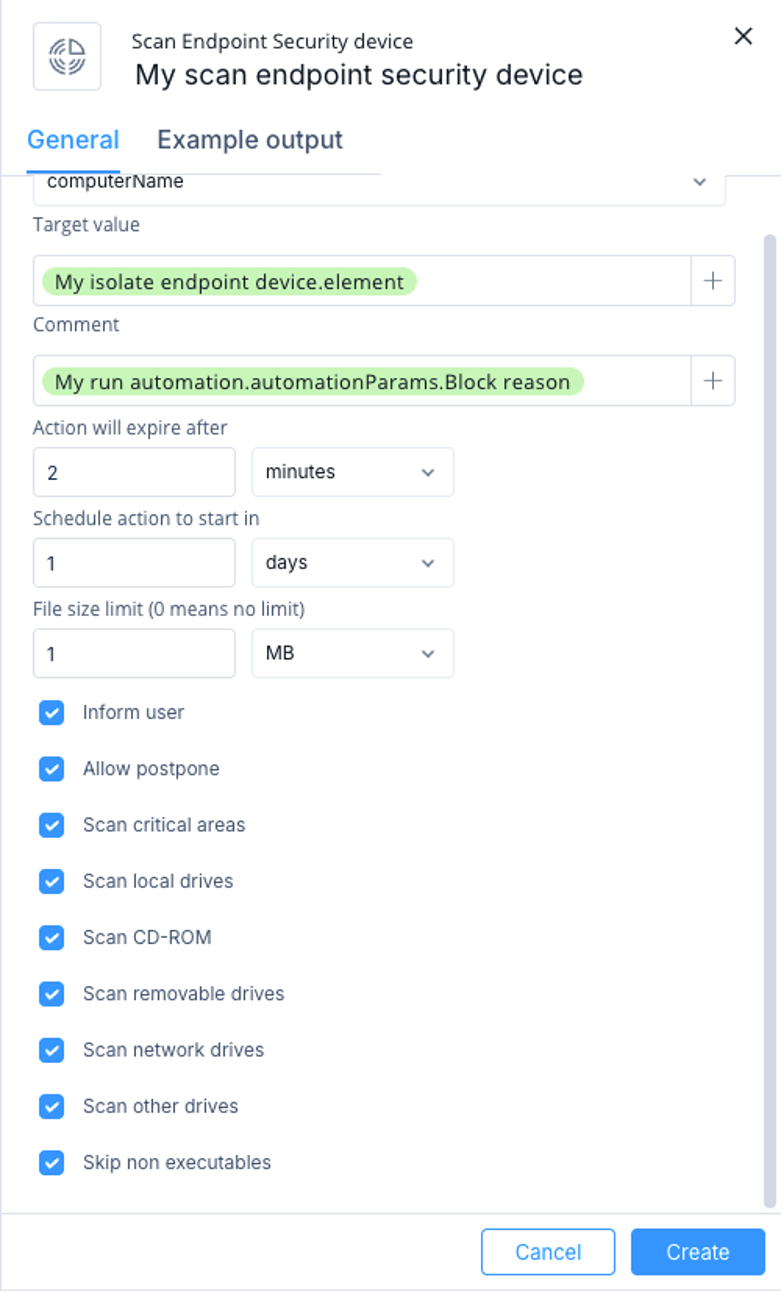
Scan an Endpoint Security device by configuring target identification, scan options, and scheduling parameters.
This task describes how to configure a Scan Endpoint Security Device action to scan an endpoint device for threats.
-
Select Scan Endpoint Security device and then click Add.
The Scan Endpoint Security device window appears.
-
Specify these:
-
Target type - Select how to identify the device:
-
computerName
-
computerId
-
computerIp
-
Target value - Enter the value that matches the selected target type, or select a value from previous step outputs or automation parameters.
-
Comment - Optional comment for the action.
-
Action will expire after - Select when the action expires.
-
Schedule action to start in - Select when to start the action. Use 0 to run immediately.
-
File size limit - Set the maximum file size to scan. Use 0 for no limit.
-
Inform user - Notify the endpoint user with a UserCheck popup message.
-
Allow postpone - Allow the endpoint user to postpone the operation.
-
Scan critical areas - Scan operating system, processes, and memory.
-
Scan local drives
-
Scan CD-ROM
-
Scan removable drives
-
Scan network drives
-
Scan other drives
-
Skip non executables
Note:
Select at least one scan area.
-
Click Create.