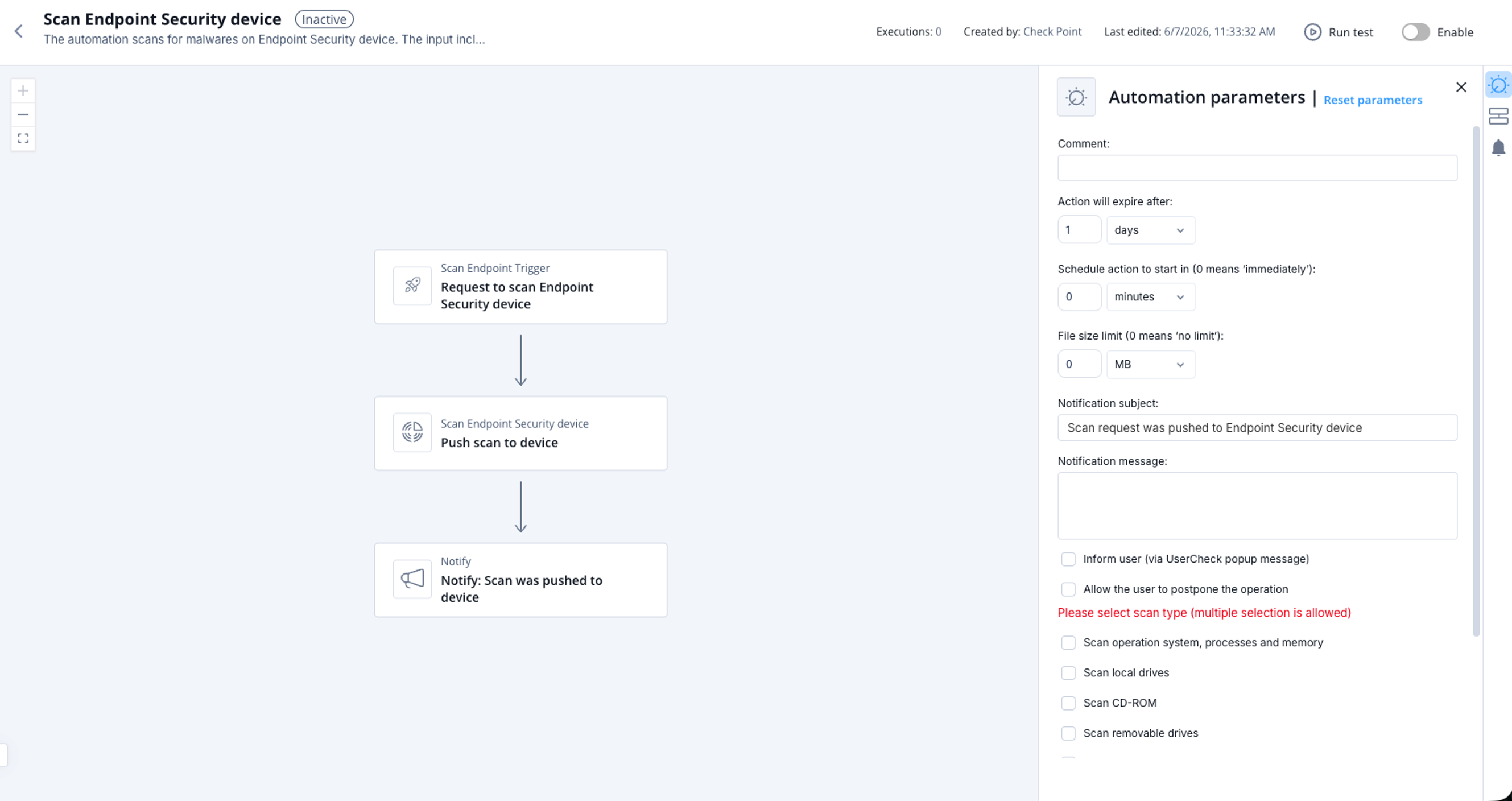
Scan Endpoint Security Device
This topic describes scanning a Endpoint Security device for malware. It provides information about supported product, parameters, trigger, and flow.
The automation scans for malwares on Endpoint Security device.
Supported Product
Endpoint Security
Parameters
You must specify at least one parameter to perform the scan.
|
Comment |
(Optional) Enter a comment or description. |
|
Action will expire after |
Set the expiration period for the automation. |
|
Schedule action to start in (0 means 'immediately') |
Schedule when to start the operation. |
|
Notification subject |
Enter a subject for a notification you receive through a configured communication tool. |
|
Notification message |
Enter the text for a notification you receive through a configured communication tool. |
|
Inform user (via UserCheck popup message) |
Select the checkbox to get a popup message during the operation. Otherwise, the automation is executed silently. |
|
Allow the user to postpone the operation |
Select the checkbox to allow users to postpone the scan. |
|
File size limit (0 means 'no limit') |
Select the checkbox to set a limit to file size. |
|
Scan operation system, processes and memory |
Select the checkbox to scan operation system, processes and memory. |
|
Scan local drives |
Select the checkbox to scan local drives. |
|
Scan CD-ROM |
Select the checkbox to scan Compact Disc Read-Only Memory (CD-ROM). |
|
Scan removable drives |
Select the checkbox to scan removable drives. |
|
Scan network drives |
Select the checkbox to scan network drives. |
|
Scan other drives |
Select the checkbox to scan other drives. |
|
Skip non executables |
Select the checkbox to skip non executables. |
Trigger
The input includes the target and its type.
Supported types:
-
computerName -
computerIp -
computerId
To view the example of this log, click ../running-automation/running-the-automation.dita.
Flow