Block external IP
This topic describes the automation that blocks incoming access from external IP addresses and details supported products, parameters, triggers, and flow information.
Supported Product
Check Point Security Management Server (Quantum)
The automation blocks the incoming access from external IP on the Check Point Security Gateway across the organization.
Parameters
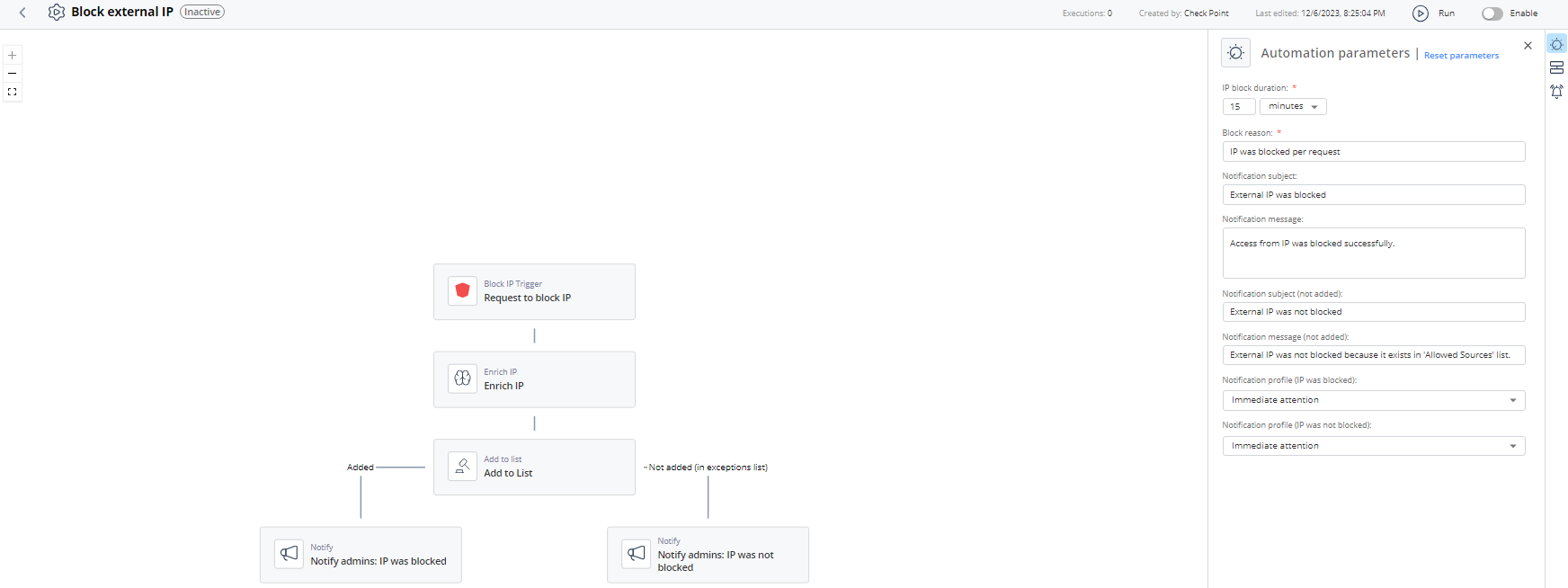
| IP block duration | Set the expiration period for the automations that are executed automatically (without Administrator's approval). |
| Block reason | Enter the reason for blocking IP. |
| Notification subject | Enter a subject for a notification you receive through a configured communication tool. |
| Notification message | Enter the text for a notification you receive through a configured communication tool. |
| Notification subject (not added) | Enter the subject for the notification that is sent to the Administrator if the IP address is not quarantined as it is listed in the Allowed Sources List. |
| Notification message (not added) | Enter the message for the notification that is sent to the Administrator if the IP address is not quarantined as it is listed in the Allowed Sources List. |
| Notification profile (IP was blocked) | Select a notification profile to send notification to Administrator if the IP address is blocked. For more information, see Notifications. |
| Notification profile (IP was not blocked) | Select a notification profile to send notification to Administrator if the IP address is not blocked as it is in the Allowed Sources List. For more information, see Notifications. |
Trigger
Matching block IP.
To view the example of this log, click Run.
Flow