Block attacking IP with malicious reputation identified by WAF Application Security
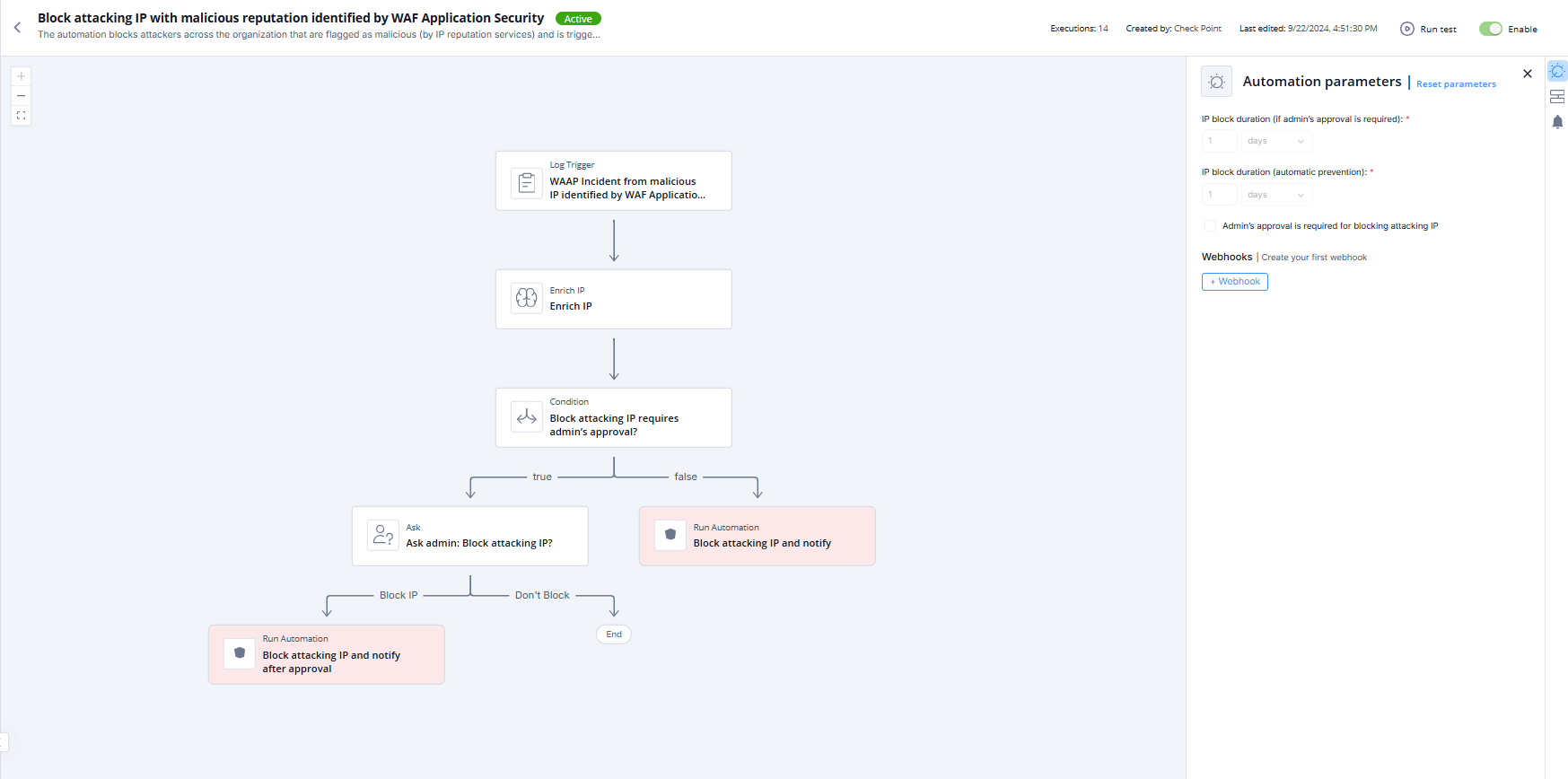
This topic describes the automation that blocks attacking IP addresses identified with malicious reputation and outlines supported products, parameters, trigger details, and flow.
Supported Products
WAF Application Security
Check Point Security Management Server (Quantum)
Parameters
|
IP block duration (if admin's approval is required) |
Set the expiration period for the automation. This applies only if you have selected the Admin's approval is required for blocking attacking IP checkbox. After the expiration, Playblocks sends the notification for the administrator's approval. |
|
IP block duration (automatic prevention) |
Set the expiration period for the automations that are executed automatically (without the administrator's approval). The default duration is 1 day. |
|
Admin's approval is required for blocking attacking IP |
Select the checkbox if you want administrator's approval to execute the automation. Check Point recommends that you leave Admin's approval is required for blocking attacking IP checkbox unselected. |
Trigger
Matching attacking IP with malicious reputation identified by WAF Application Security.
To view the example of this log, click Run.
Flow