This topic describes the Automations page and its interface elements. It provides details about automation categories, views, filtering options, and automation card components.
This topic lists predefined automations available in the system. It provides links to automation actions triggered by various security detections and events.
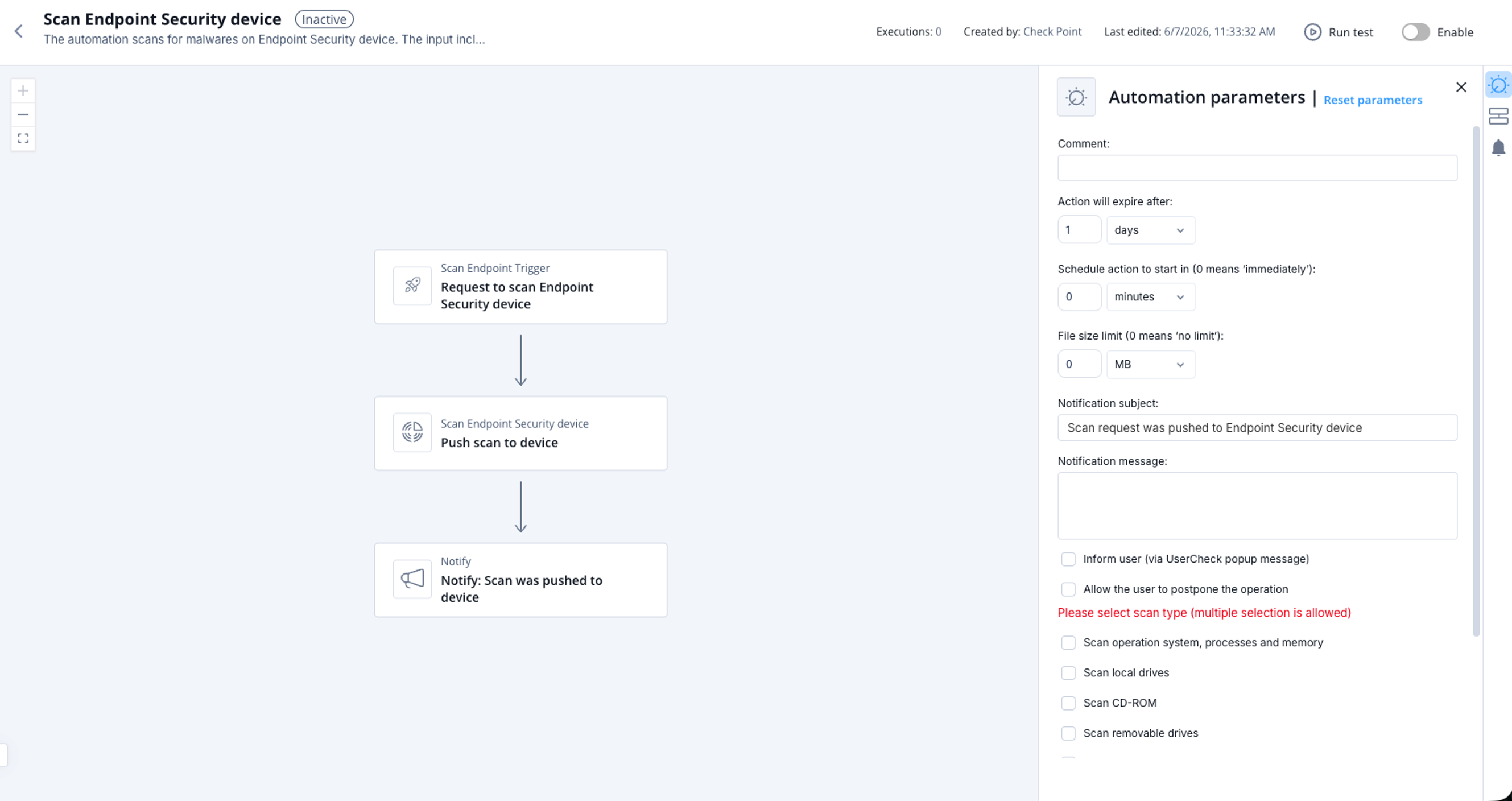
This topic describes scanning a Endpoint Security device for malware. It provides information about supported product, parameters, trigger, and flow.
This topic introduces the automated response capabilities of PlayBlocks and its integration with collaborative tools. It provides an overview of how PlayBlocks helps protect organizations from cyber attacks.
This topic describes the initial steps required to begin working with PlayBlocks. It provides links to create an account, access the portal, license the product, and onboard services.
This topic describes the Overview page, which displays key information and statistics about Playblocks. It explains how to access the Overview page and view its data.
This topic describes the Automation Parameters and Flowchart page and outlines the items displayed in the interface. It also provides steps to access the automation details.
This topic describes automation that blocks attackers based on IPS-detected popular attacks and outlines supported products, parameters, triggers, and flow details.
This topic describes automation that blocks scanners detected by the IPS blade with high confidence and outlines its parameters, trigger, and flow.
This topic describes the automation that blocks attackers flagged as malicious by IP reputation services and triggered by IPS-detected attacks. It also lists supported products, parameters, triggers, and workflow details.
This topic describes the automation that blocks attacking IP addresses identified with malicious reputation and outlines supported products, parameters, trigger details, and flow.
This topic describes settings and behavior for quarantining compromised Endpoint Security devices enforced by a Check Point Firewall. It includes supported products, parameters, trigger details, and flow information.
This topic describes quarantining potentially infected Endpoint Security devices and provides details about supported products, parameters, triggers, and the automation flow. It explains configuration options and associated behaviors.
This topic describes an automation that sends a notification when firewall traffic is blocked by Check Point SASE. It outlines supported product details, parameters, triggers, and flow.
This topic describes an automation that sends notifications when standard risk URL filtering events are blocked by Check Point SASE and explains its parameters and trigger conditions.
This topic describes the automation that sends notifications when a URL reputation is detected by Check Point SASE and outlines its parameters, trigger conditions, and workflow.
This topic describes an automation that notifies when a SASE tunnel is detected as up. It explains supported products, parameters, trigger conditions, and flow.
This topic describes the automation that sends notifications when a Check Point SASE tunnel is detected as down and outlines its parameters, trigger, and flow.
This topic describes an automation that sends notifications when a malicious file is detected by Check Point SASE Threat Prevention. It includes supported product details, configurable parameters, trigger conditions, and the automation flow.
This topic describes an automation that adds a malicious file indicator identified by Threat Extraction Endpoint Security to an IOC feed to enhance threat intelligence and response.
This topic describes the automation that adds a malicious file indicator identified by Threat Emulation Endpoint Security to an IOC feed for enhanced threat intelligence and response.
This topic describes an automation that adds malicious file indicators identified by Anti-Bot Endpoint Security to an IOC feed to enhance threat intelligence and security response. It outlines supported products, parameters, trigger conditions, and flow.
This topic describes an automation that blocks malicious URL indicators identified by Anti-Bot Endpoint Security by adding them to an IOC feed to enhance threat intelligence and response.
This topic describes an automation that adds a malicious URL identified by SASE as an indicator to an IOC feed. It updates threat intelligence to enhance security response.
This topic describes an automation that adds a malicious URL identified by Anti-Bot to an IOC feed to enhance threat intelligence and security response.
This topic describes how the automation blocks a malicious URL identified by Anti-Virus by adding it as an indicator to an IOC feed. It summarizes supported products, parameters, trigger conditions, and the automation flow.
This topic describes the automation that adds a malicious URL identified by Zero Phishing Endpoint Security to an IOC feed. It updates threat intelligence and enhances the security response.
This topic describes an automation that adds a malicious URL identified by the Email Security blade as an indicator to an IOC feed. It helps update threat intelligence and enhance security response.
This topic describes an automation that blocks a malicious URL identified by Zero Phishing by adding it as an indicator. It updates threat intelligence to enhance security response.
This topic describes the automation that isolates compromised Endpoint Security devices and details its supported product, parameters, trigger, and workflow.
This topic describes the automation that isolates potentially infected Endpoint Security devices and lists its parameters, trigger conditions, and flow. It explains how the automation helps prevent threats from spreading inside an organization.
This topic describes automation settings for isolating SentinelOne devices with high‑severity infections and details supported products, parameters, trigger conditions, and flow.
This topic describes how the automation isolates CrowdStrike devices with high severity infections and lists its parameters, triggers, and operational flow.
This topic describes quarantining SentinelOne devices with high-severity infections and lists supported products, parameters, triggers, and flow. It explains how automation settings control quarantine behavior.
This topic describes the AI-based automation that analyzes CPM Doctor reports and outlines supported products, parameters, triggers, and flow. It provides details for configuring ticketing options and scheduling.
This topic describes the automation that isolates potentially infected Microsoft Defender devices and outlines supported products, parameters, trigger conditions, and flow information.
This topic describes how to quarantine potentially infected Microsoft Defender devices when enforcement is applied by the firewall. It includes supported products, parameters, trigger details, and automation flow.
This topic describes the automation that resets passwords when credentials leakage is detected by External Risk Management. It also lists supported products, parameters, trigger conditions, and the flow diagram.
Describes the health monitor that evaluates cloud log ingestion status for Check Point Firewall Management Servers and notifies administrators about failures or successful ingestion events. Includes supported products, parameters, triggers, and the process flow.
This topic describes automation behavior for repeated Remote Access login failures using password-only authentication and the configurable parameters that control it.
This topic describes notifications and blocking behavior for repeated Remote Access login attempts to expired accounts. It also lists supported products, parameters, trigger conditions, and the automation flow.
This topic describes automation notifications triggered by Remote Access user logins that use password-only authentication. It outlines supported products, parameters, and the event flow.
This topic describes the automated blocking of attackers detected by DDoS Protector and outlines supported products, parameters, trigger conditions, and flow information. It includes details about configuration options and automation behavior.
This topic describes automation behavior that quarantines devices identified by CrowdStrike as potentially infected. It also details supported products, parameters, trigger conditions, and the process flow.
This topic describes the automation that removes isolation from a potentially clean Microsoft Defender machine upon administrator approval. It outlines supported products, parameters, trigger conditions, and flow details.
This topic describes an automation that notifies when an administrator login to the GAIA Portal fails. It includes supported products, trigger conditions, and a flow diagram.
This topic describes the notification generated when an Expert Shell login occurs on Gaia or Embedded devices and lists supported product versions, parameters, triggers, and flow.
This topic describes the notification generated when scripts are executed on a Gaia device. It outlines the included notification details and related flow information.
This topic describes notification behavior when a policy installation on Check Point Firewall fails. It outlines supported products, trigger conditions, and the automation flow.
This topic describes automated notifications triggered by degradation in Check Point Firewall Compliance status and configurable parameters for reporting and ticket creation.
This topic describes automated notifications triggered upon successful policy installation on Check Point Firewall. It outlines supported products, trigger conditions, and flow information.
This topic describes an automation that notifies about changes in administrators and their permissions in the management server. It explains supported products, parameters, trigger conditions, and the automation flow.
This topic describes alerts generated when MTA email bypass is detected and the parameter controlling repeated notifications. It also provides product support information, trigger details, and flow visualization.
This topic describes notifications for validation errors or warnings on Management and outlines parameters, triggers, and flow.
This topic describes automated notifications triggered by a change-over event in the management high availability environment. It outlines supported products, parameters, trigger conditions, and the automation flow.
This topic describes the automated notification for repeated login failures to Management and the parameters that control its behavior.
This topic describes how the automation notifies when a high number of blocked connections occur from the same origin machine. It also lists the parameters and trigger conditions for this notification.
This topic describes notifications generated when blade update installations fail on Check Point Firewalls. It includes supported products, parameters, trigger conditions, and the automation flow.
This topic describes automation that notifies on successful installation of blade updates on Check Point Firewalls and provides details about related parameters and triggers. It also includes product support information and a flow diagram.
This topic describes automation behavior for notifying and opening tickets when licenses on Check Point Firewall devices are about to expire. It also lists the supported product, parameters, trigger, and flow of the automation.
This topic describes how automation alerts when VPN certificates expire on Check Point Firewalls and outlines the configurable parameters for expiration monitoring.
This topic describes an automation that sends an alert when a permanent VPN tunnel goes down. It explains supported products, configuration parameters, trigger conditions, and flow behavior.
This topic describes the alert generated when Check Point Firewall Management cannot communicate with one or more Check Point Firewalls. It lists supported products, parameters, trigger conditions, and the automation flow.
This topic describes an automation that sends notifications when non-compliant devices are blocked by the identity and trust system. It outlines supported products, triggers, and the flow.
This topic describes the automation that blocks incoming access from external IP addresses and details supported products, parameters, triggers, and flow information.
This topic describes isolating an endpoint device through automated actions. It includes supported products, parameters, trigger details, and a flow diagram.
This topic describes how internal devices are quarantined by blocking their outgoing access across the organization. It explains the automation behavior applied on the security gateway.
This topic describes the automation that enforces best practice policy on a newly discovered IoT zone. It outlines supported products, trigger conditions, and the automation flow.
This topic describes notifications generated when an IoT device is at risk and the available administrative actions. It also outlines supported products, parameters, triggers, and flow information.
This topic describes automation that notifies when the Endpoint Security client uninstall password changes. It includes supported product details, parameters, trigger conditions, and flow information.
This topic describes automation that notifies when multiple Endpoint Security clients are uninstalled within a defined time period. It also outlines supported products, parameters, trigger conditions, and flow information.
This topic describes an automation that alerts on repeated login failures to a user’s Windows device. It provides information about failure counting and details included in the notification.
This topic describes how the automation resets a user password in the identity provider linked to the account. It outlines supported products, parameters, triggers, and the automation flow.
This topic describes the automation that deletes a file on a Endpoint Security device and outlines its parameters, triggers, and workflow.
This topic describes the automation that terminates a process on a Endpoint Security device.
This topic describes the parameters available for configuring a scan. It provides explanations for each option you can set.
This topic describes the trigger input and the supported target types. It also provides a link to view an example log.
This topic describes the settings and parameters used to add a new indicator to an IOC feed. It also outlines the trigger behavior and provides a flow diagram.
This topic describes how an automation deletes an existing indicator from an IOC feed and lists parameters, triggers, and flow information.
This topic describes how the automation stops and quarantines a file on a Microsoft Defender machine and outlines the required parameters, trigger details, and flow.
This topic describes how the automation scans a machine using Microsoft Defender and details supported products, parameters, triggers, and flow.
This topic describes the automation used to isolate a machine protected by Microsoft Defender. It outlines supported products, parameters, trigger conditions, and the automation flow.
This topic describes an automation that releases a Microsoft Defender protected machine from isolation when triggered by XDR. It explains supported products, parameters, trigger behavior, and the automation flow.
This topic describes an automation that stops and quarantines a file on a machine protected by Microsoft Defender using XDR. It outlines supported products, parameters, trigger, and automation flow.
This topic describes the automation behavior when an SD-WAN link swap occurs due to an ISP outage and a critical ticket is generated for follow-up. It also summarizes supported products, parameters, trigger conditions, and workflow.
This topic describes how an automation creates a ticket in an enabled ticketing system based on a provided subject and description. It also lists supported products, parameters, trigger information, and flow details.
This topic describes the automation process that closes a ticket using a ticket number, close state, and close description. It also outlines supported products, parameters, triggers, and the automation flow.
This topic describes how the automation retrieves a ticket number and returns all available information about the ticket. It also lists supported products, parameters, triggers, and shows the process flow.
This topic describes how the automation opens a ticket and sends notifications when an event occurs. It also lists the configurable parameters and trigger behavior.
This topic describes the automation used by Spark Management to handle detected events and shows the associated flow.
This topic describes an automation that alerts when a ransomware attack is detected and outlines supported products, parameters, triggers, and workflow.
This topic describes notifications generated when a Generative AI risky session is detected and outlines the parameters, trigger conditions, and flow.
This topic describes the alert generated when a phishing attempt is detected by Endpoint Security and lists its configurable parameters and trigger details.
This topic describes the alert generated when a malicious file is detected by Endpoint Security and outlines its parameters, trigger, and flow. It provides information for configuring thresholds and notification settings.
This topic describes the alert triggered when access to a malicious site is detected by Endpoint Security and outlines the available automation parameters. It also provides information about the trigger and flow of the automation.
This topic describes the alert triggered when a password reuse attempt is detected and explains the parameters and flow of the automation. It includes supported product information, trigger conditions, and configuration options.
This topic describes alert behavior when an exploit attempt is detected and details the parameters, trigger conditions, and flow for the automation. It provides configuration information for thresholds, severity, and notification settings.
This topic describes the alert generated when the Endpoint Security Static Analysis capability becomes outdated. It outlines the trigger, supported product, and flow of this automation.
This topic describes an automation that notifies when the Endpoint Security Offline Reputation capability is outdated. It provides information about the supported product, trigger conditions, and flow.
This topic describes an automation alert that notifies when the Endpoint Security Behavioral Guard capability becomes outdated. It provides information about the trigger and flow of the alert.
This topic describes the automation that notifies when a Endpoint Security client becomes disconnected. It outlines the supported product, parameters, trigger, and flow.
This topic describes how the automation notifies users when Endpoint Security compliance warnings are triggered. It also provides information about supported products, parameters, triggers, and flow.
This topic describes notifications generated when device restrictions are initiated by the Endpoint Security compliance capability. It outlines supported products, parameters, triggers, and the process flow.
This topic describes the alert generated when the Endpoint Security Anti-Malware capability is outdated. It also lists supported products, parameters, triggers, and flow information.
This topic describes an automation that alerts when a device has not been fully scanned by the Endpoint Security Anti-Malware capability. It outlines supported products, trigger conditions, and the flow of the automation.
This topic describes the alert generated when the Endpoint Security Anti-Malware license expires and outlines its trigger and flow.
This topic describes the alert generated when a Endpoint Security Client deployment fails. It also outlines the supported product, trigger conditions, and flow overview.
This topic explains the alert that notifies when one or more Endpoint Security client capabilities stop running or fail to report their status.
This topic describes an automation that adds SHA256 hashes of malicious files identified by CrowdStrike to an IOC feed. It helps enhance threat intelligence and security response.
This topic describes an automation that adds SHA1 hashes of malicious files flagged by SentinelOne to an IOC feed. It updates threat intelligence and can help prevent malicious files from running on devices.
This topic describes an automation that adds SHA1 hashes of malicious files detected by Microsoft Defender into an IOC feed. It also adds the source URL to enhance threat intelligence and security response.
This topic describes the automation that notifies when Events & AIOps alerts are detected. It outlines the trigger and shows the flow of the notification process.
This topic describes how to configure automation parameters in Playblocks and how to reset them to default values.
This topic describes how to manually run an automation for evaluation and verification purposes. It provides step-by-step instructions for accessing, configuring, and executing an automation.
This topic describes how to enable an automation in Playblocks. Automations are enabled by default but can be manually activated.
This task explains how to approve, reject, or revert an automation execution through communication channels or the Pending Actions page.
Playblocks provides flexible customization options to tailor automations according to your organization's needs.
This topic describes how webhooks enable third-party systems to trigger automations. It outlines common uses for out-of-the-box, custom, and cloned automations.
This topic describes the Monitor page, which displays statistics and visual widgets showing automation activity and prevention data. It summarizes the available monitoring views and their functions.
This topic describes the Executions page and how to access it. It provides an overview of the information shown for executed automations.
This topic describes the Pending Actions page, which lists automation executions awaiting approval. It also explains how to access this page in Playblocks.
This topic describes the Lists page, which shows various types of destinations, sources, devices, and identities managed by the system. It explains the purpose of each list category.
This topic describes connectors used in Playblocks and explains how they support automatic incident response and collaboration. It also shows how to access the Connectors page and identifies automatically connected products.
The Notifications page provides options to manage who receives notifications and how they are delivered. It also displays legends describing available actions and views.
This appendix provides links to supporting procedures for integrating various external services with Check Point Playblocks. It lists additional configuration resources for multiple platforms.