The Conditional Access feature allows an organization to automatically control access to corporate resources from compromised devices (marked as High Risk).
This policy enforcement is independent of Unified Endpoint Management (UEM) solutions.
This category is a list of corporate IP addresses and/or FQDN hostnames that a device at high risk cannot access.
-
Go to Policy and select a policy profile.
-
Click Network > Content Inspection > Conditional Access.
-
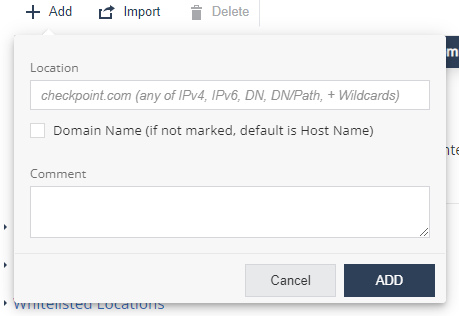
Click Add.
A pop-up window appears.
-
In the Location field, enter the network location in one of these formats: IPv4, IPv6, Domain Name (DN), DN/URL, + Wildcards.
-
Select the Domain Name checkbox to enter location as domain name.
For example, if you enter Location as google.com, and select this checkbox, it is interpreted as domain name and includes all URLs in *.google.com. If not set, location value is interpreted as host name (www.google.com).
-
(Optional) Add comments.
-
Click Add.
-
To import conditional access for a list of URLs, click Import and upload the .CSV file with URL names list and comments.
-
To delete a network location from the list, select it and click Delete.
-
To save the policy changes, click Save.
