Jump to main content
Mobile Security Administration Guide
Check Point Support
  1. Home
  2. Policy
  3. Policy Profiles
  • Important Information
  • Introduction to Mobile Security
  • Getting Started
  • Video Tutorials

  • Menu Bar
  • Overview
  • Devices
  • Policy
    • Rulebase
    • Policy Configuration
    • Policy Profiles
      • Creating a New Policy Profile
      • Copying an Existing Policy
      • Exporting and Importing a Policy
      • Policy Header
    • Network Protection
    • Device Policies
    • Application Policies
    • File Policies
    • Network Policies
    • Access Policies
  • Forensics
  • Settings
  • Administrators
  • Announcements
  • Infinity AI Copilot
  • Appendix A - Mobile Security Communication Information
  • Appendix B - Mobile Security Syslogs
  • Appendix C - Mobile Security ArcSight
  • Appendix D - Permissions for Mobile Security Protect app

    This topic describes the permissions required for the Mobile Security Protect app to ensure correct operation of the Mobile Security solution. It summarizes how these permissions are granted on protected mobile devices.

  • Appendix E - Renewing a CA Certificate
  • Appendix F - Mobile Security Audit Logs

Policy Profiles

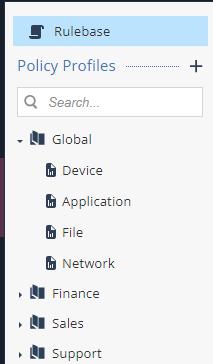
Every policy profile that you create includes a pre-configured set of items to which the profiles apply:

  • Device. See Device Policies.

  • Application. See Application Policies.

  • File. See File Policies.

  • Network Policies. See Network Policies.

Global policy profile is the default policy for all devices.
Generated by <oXygen/> XML WebHelp
15 September 2026
© 2020 - 2026 Check Point Software Technologies Ltd.