
Rulebase
When you open the Policy tab, the Rulebase displays a rulebase list with the Global policy profile as default.
When you add new policy profiles, they are added to the rulebase to apply them on the appropriate device groups.
The rules are processed in order from top to bottom (aka first-match). Once a match for the device is made, that policy is applied to the device. For example, if a device matches two policies, the highest-ranked matching policy is applied to the device.
-
Place the most specific policies higher in the list.
-
Keep the Global policy at the bottom of the list.
-
To reorder policies, drag the rule number up or down.
To activate a policy and apply it to a device group:
- Click
 or
or  .
.A new line is added to the rule base list.

- Enter these:
- Rule Name
- Select the devices or device groups from the list.
- Select the policy profile from the list.
For more information, see Policy Profiles.
- (Optional) Enter a comment.
- Click Save.
- To move a rule, click the rule # up or down, drag and drop as required.
- To view all changes before you save them, click
 and then click View Changes.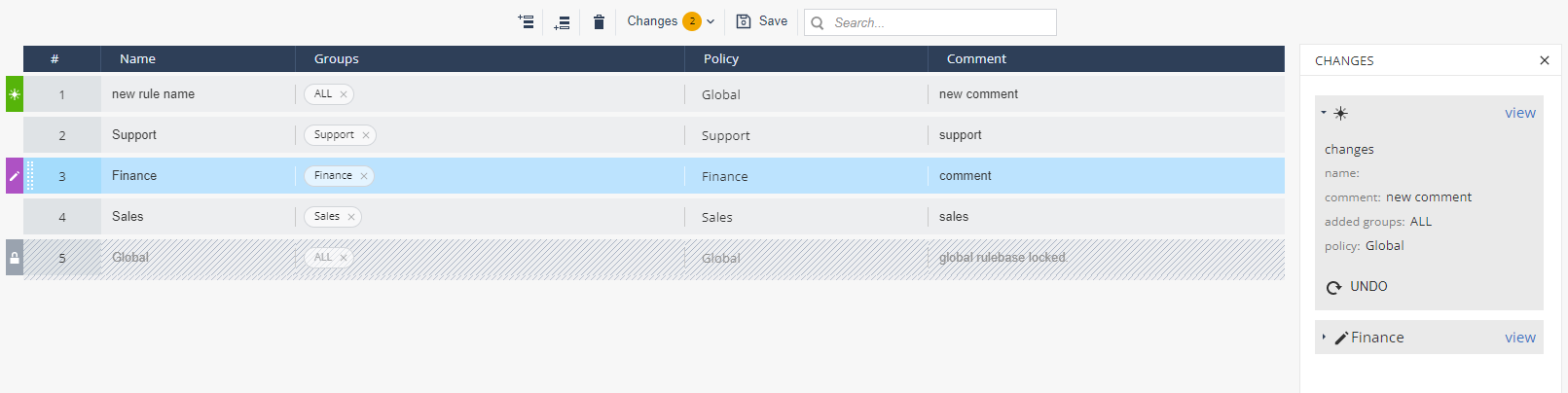
- Click Save.