
Overview
The Overview page shows these sub-menus:
Overview Dashboard
The Overview dashboard shows the statistics and snapshot data based on the information from the enrolled devices.
You can select specific device groups and view the statistics for:
-
Device Risk
-
Device Status
-
Top Threats
-
Security Events By Type
Click on each statistics value to view its related settings.
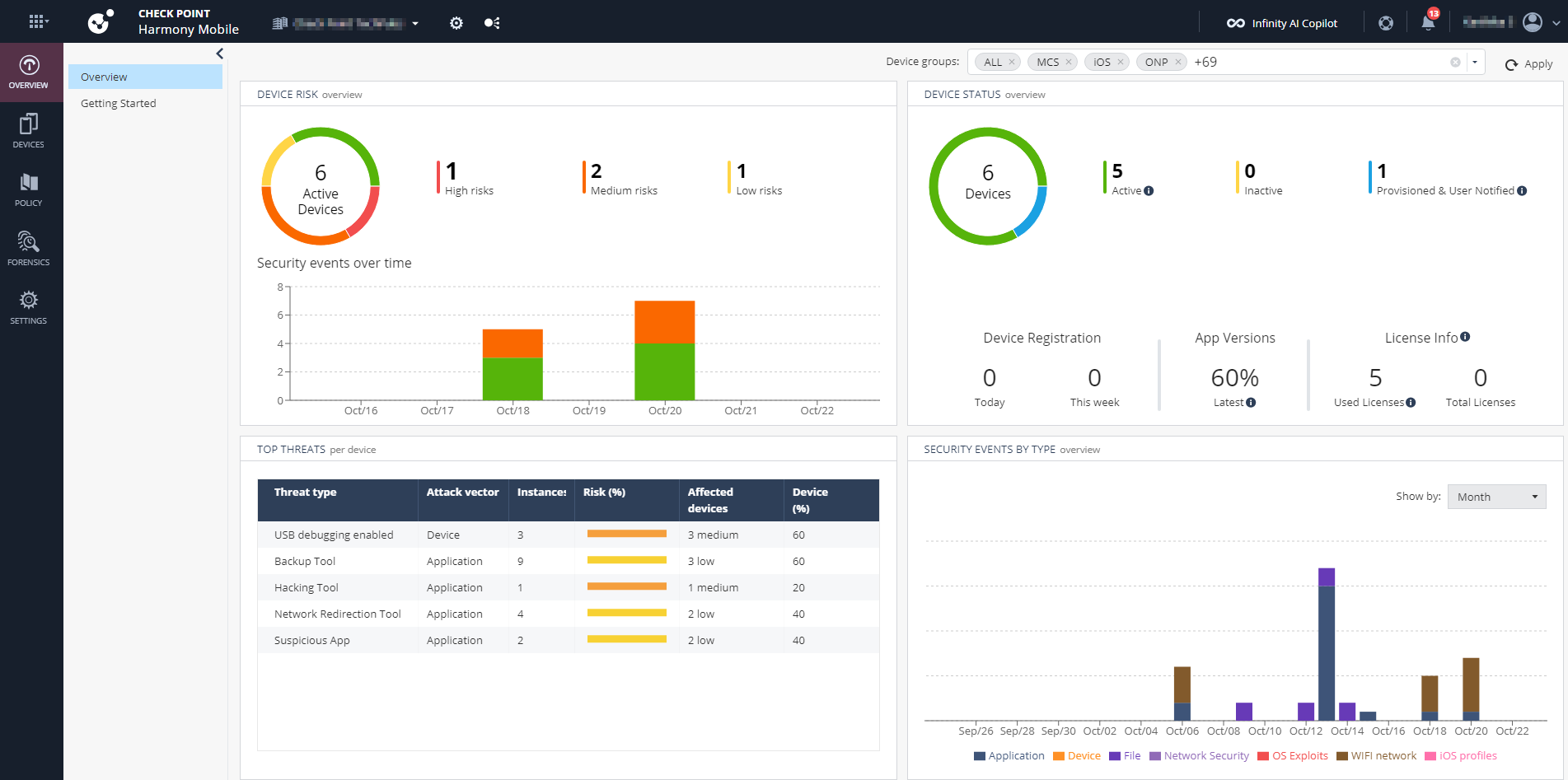
To view the overview statistics for specific device groups, select the groups from the Device groups list at the top-right corner, and click Apply.

| Widget | Description | ||||||||||||||
|---|---|---|---|---|---|---|---|---|---|---|---|---|---|---|---|
| Device Risk |
Displays the number of devices in the organization that are currently at risk under these categories:
|
||||||||||||||
| Device Status |
Displays the number of devices registered in the dashboard under these categories:
|
||||||||||||||
| Top Threats per device |
Displays the top threats encountered by devices. The table shows:
|
||||||||||||||
| Threat type |
Type of threat factor that affected your devices. |
||||||||||||||
| Attack vector |
Attack vector through which the threat factor affects the device:
|
||||||||||||||
| Instances |
Number of applications or devices affected by the specific threat type. To view the security events details, click the instances count. The system displays the following:
|
||||||||||||||
| Risk (%) |
Percentage of the threat type determined by the risk levels assigned to it in the policies of affected devices, color-coded according to the risk levels. In this example, the USB debugging enabled threat type is assigned High risk in one device policy and Medium risk in the policies of other devices.
|
||||||||||||||
| Affected devices |
Number of devices affected by the specific threat type and the corresponding risk level assigned to that threat type in the device policy. For example, 2 medium indicates that there are two devices affected with the specific threat type and that threat type is assigned Medium risk level in the device policy. Note:
This is the risk level caused by the specific threat type and not the overall device risk level. To view the security events details, click the device count link. The Forensics > Events & Alerts page appears and shows the list of devices with active events that have been reported, but not yet addressed. |
||||||||||||||
| Devices (%) |
The proportion of devices in your mobile fleet affected by the specific threat type. |
||||||||||||||
| Security Events by Type |
Displays the number of security events by their types (marked in colors) over time for last hour, day, or month and shows the total number of applications scanned from the devices enrolled to the dashboard. |

Getting Started Page
If you have not added devices to the Mobile Security solution, then you are directed to the Getting Started page after you log in to the Mobile Security Administrator Portal.

In this page, you can easily enroll new users and devices to Mobile Security using these methods:
-
Start a demo - Experience connecting a single end-user and device.
-
Sync with UEM - Connect Mobile Security to your preferred UEM and start synchronizing users and devices to Mobile Security.
-
Invite by email - Invite a single or multiple users, or user groups to enroll to Mobile Security. Each user receives an email with the QR code and instructions for enrollment.