
Appendix E - Renewing a CA Certificate
A certificate trusted by a Certificate Authority (CA) is required for the On-device Network Protection (ONP) to inspect the HTTPS traffic on the end-user device. When the CA certificate expires, you must renew the certificate and deploy it on the device through the Unified Endpoint Manager (UEM).
We recommend you renew the CA certificate at least two weeks before the expiration date.
Note:
The SSL inspection for the device is disabled during this process.
Updating Policy to Disable Device Alerts
To update your policy to avoid device alerts while renewing the certificate:
- In the Mobile Security Administrator Portal, go to Policy and select a policy profile.
- Click any one of these:
-
Device
-
Application
-
File
-
Network
-
- Go to Network Protection >
HTTPS Settings and set Network Protection TLS not installed risk level as Medium (No Device Alert).
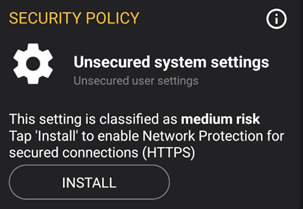
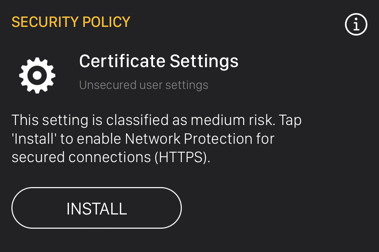
 Otherwise, the device receives these alerts:
Android:
iOS
- Go to Network Protection > HTTPS Settings and set Network Protection TLS not installed risk level as Medium (No Device Alert).
- Click Save.