
Application Policies
Malicious Applications
Applications that have both risky capabilities and have malicious intents are categorized as malicious applications by the Mobile Security Behavioral Risk Engine (BRE). Their risk level is always set to High and you cannot configure it.
Risky Applications
Applications that have bad reputation or that may pose a security risk to the organization are considered to be risky applications.
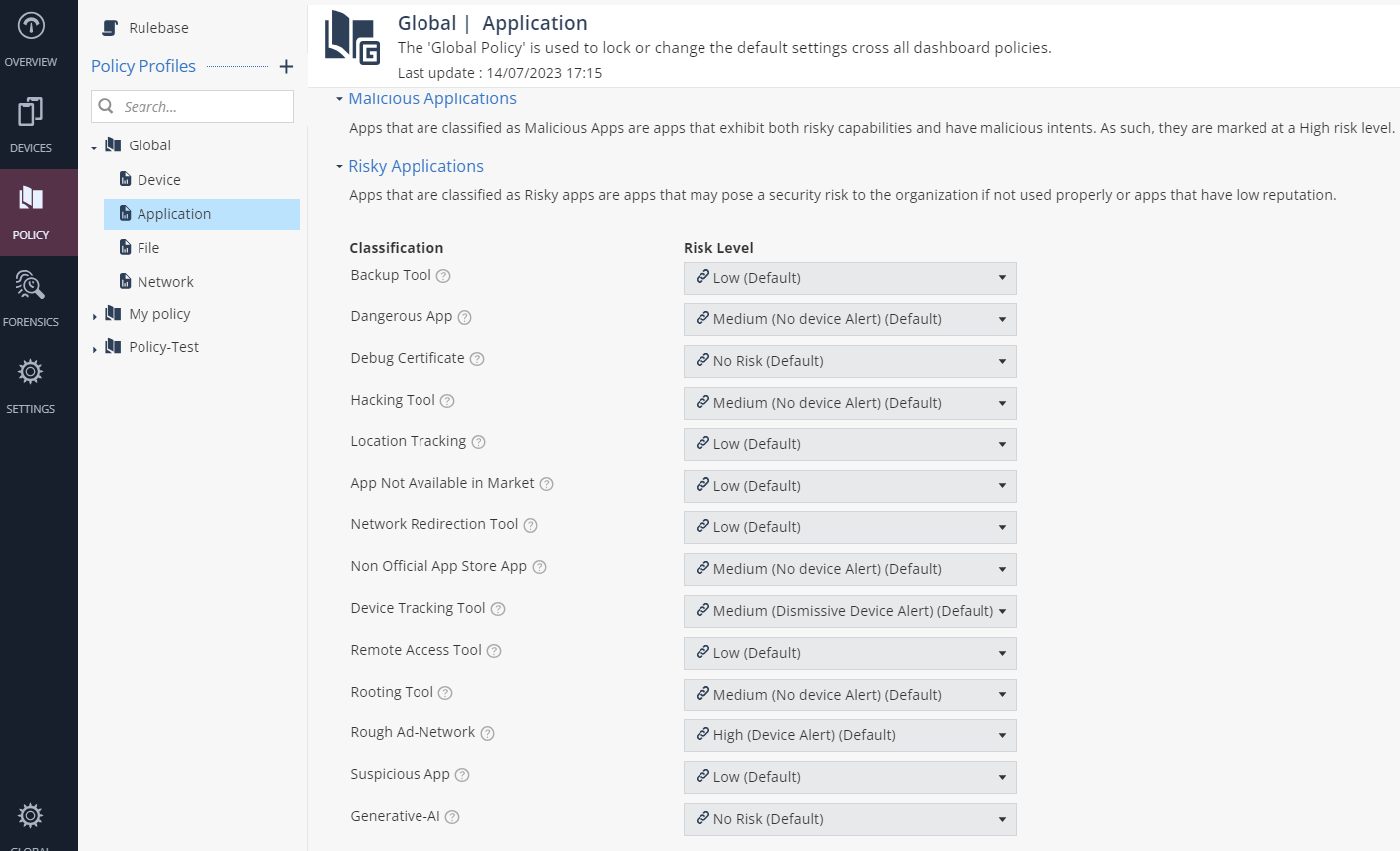
To set the risk level for these applications:
- Go to Policy and select a policy profile.
- Click Application >
Risky Applications and set the Risk Level for these classifications:
Classification Description Risk Level Backup Tool Set the Risk Level if an application backs up sensitive information from the device. - Low (Default)
- High (Device Alert)
- Medium (Device Alert)
- Medium (No Device Alert)
- Medium (Dismissive Device Alert)
- Low
- No Risk
Dangerous App Set the Risk Level if a legitimate application can compromise the device, change configuration, or provide unauthorized access to corporate resources. - High (Device Alert) (Default)
- High (Device Alert)
- Medium (Device Alert)
- Medium (No Device Alert)
- Medium (Dismissive Device Alert)
- Low
- No Risk
Debug Certificate Set the Risk Level if an application is signed by a debug certificate. - No Risk (Default)
- High (Device Alert)
- Medium (Device Alert)
- Medium (No Device Alert)
- Medium (Dismissive Device Alert)
- Low
- No Risk
Hacking Tool Set the Risk Level if an application compromises local network data, device data or application data (on either device or server). - Medium (No Device Alert) (Default)
- High (Device Alert)
- Medium (Device Alert)
- Medium (No Device Alert)
- Medium (Dismissive Device Alert)
- Low
- No Risk
Location Tracking Set the Risk Level if an application allows remote access to the device location without the user's consent. - Low (Default)
- High (Device Alert)
- Medium (Device Alert)
- Medium (No Device Alert)
- Medium (Dismissive Device Alert)
- Low
- No Risk
App Not Available in Market Set the Risk Level if an application previously available in the app store is removed. - Low (Default)
- High (Device Alert)
- Medium (Device Alert)
- Medium (No Device Alert)
- Medium (Dismissive Device Alert)
- Low
- No Risk
Network Redirection Tool Set the Risk Level if an application redirects network communication without the user's consent. - Low (Default)
- High (Device Alert)
- Medium (Device Alert)
- Medium (No Device Alert)
- Medium (Dismissive Device Alert)
- Low
- No Risk
Non Official App Store App Set the Risk Level if an application is not verified by an official app store. - Medium (No Device Alert) (Default)
- High (Device Alert)
- Medium (Device Alert)
- Medium (No Device Alert)
- Medium (Dismissive Device Alert)
- Low
- No Risk
Device Tracking Tool Set the Risk Level if an application allows remote access to the device location without the user's consent. - Medium (Dismissive Device Alert) (Default)
- High (Device Alert)
- Medium (Device Alert)
- Medium (No Device Alert)
- Medium (Dismissive Device Alert)
- Low
- No Risk
Remote Access Tool Set the Risk Level if an application allows remote control of the device without the user's consent. - Low (Default)
- High (Device Alert)
- Medium (Device Alert)
- Medium (No Device Alert)
- Medium (Dismissive Device Alert)
- Low
- No Risk
Rooting Tool Set the Risk Level if an application is identified as a rooting or jailbreak tool. - Low (Default)
- High (Device Alert)
- Medium (Device Alert)
- Medium (No Device Alert)
- Medium (Dismissive Device Alert)
- Low
- No Risk
Rough Ad-Network Set the Risk Level if an application contains an ad-network and can leak sensitive data from the device and violates user privacy. - High (Device Alert) (Default)
- High (Device Alert)
- Medium (Device Alert)
- Medium (No Device Alert)
- Medium (Dismissive Device Alert)
- Low
- No Risk
Suspicious App Set the Risk Level if an application has suspicious capabilities. - Medium (No Device Alert) (Default)
- High (Device Alert)
- Medium (Device Alert)
- Medium (No Device Alert)
- Medium (Dismissive Device Alert)
- Low
- No Risk
Generative-AI Set the Risk Level if an application uses Artificial Intelligence (AI) services. - No Risk (Default)
- Medium (Device Alert)
- Medium (No Device Alert)
- Medium (Dismissive Device Alert)
- Low
- No Risk