Protected DNS

Protected DNS provides secured DNS services over Mobile Security On-device Network Protection.
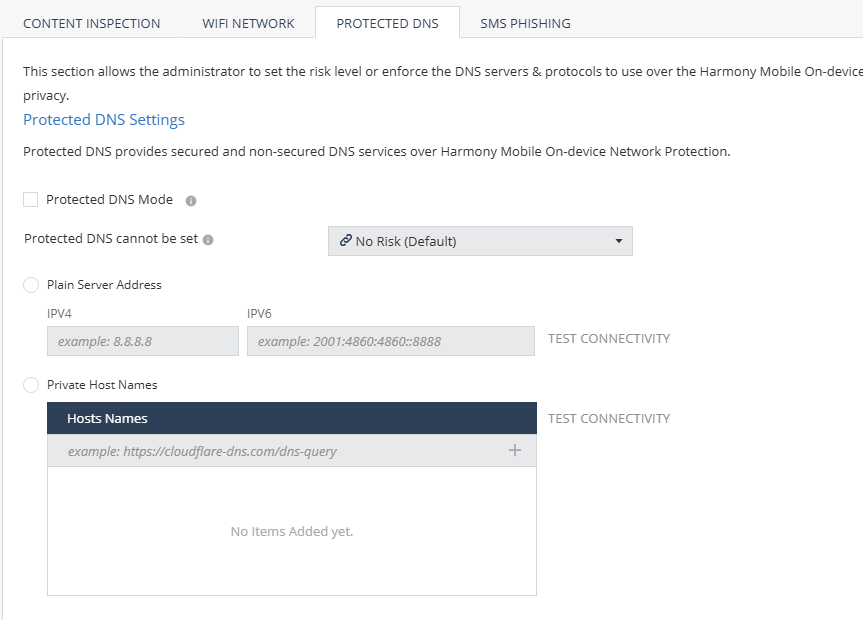
A protected DNS service:

  • Enhances user privacy and security.

  • Ensures that users use their corporate DNS servers instead of the Internet Service Provider (ISP) servers, thereby preventing DNS-spoofing attacks.

  • Enforces safe DNS protocols such as DNS over HTTPS (DoH) instead of the plain DNS requests (UDP/53) for end-user privacy.

  1. Go to Policy and select a policy profile.
  2. Go to Network > Protected DNS and set these parameters:
    Item Description
    Protected DNS Mode

    Indicates whether to enable the protected DNS feature. When it is enabled, Mobile Security on-device Protected DNS becomes the default DNS service for the mobile device.

    Protected DNS cannot be set

    Set the risk level if the protected DNS feature cannot be set on the device due to one of these reasons:

    • Device is already configured with Private DNS (Android).

    • DNS server is inactive.

    • DNS server does not support secure DNS (DoH/DoT).

    Plain Server Address

    Add the plain DNS service. Set the IPv4 and IPv6 server addresses for the plain DNS service.

    Private Host Names

    Add the HTTPS host name to add private (third-party) protected DNS service.

  3. To save the policy changes, click Save.