
Port Scan Settings
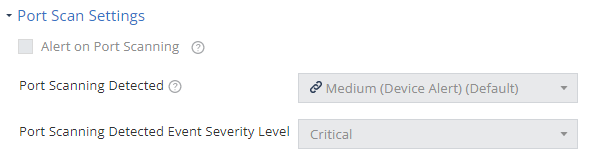
Mobile Security detects scan attempts for open ports on a mobile device. Set the risk level and the policy associated with this attack technique in this section.
- Go to Policy and select a policy profile.
- Click Network > WiFi Network > Port Scan Settings.
- Select the Alert on Port Scanning checkbox.
- From the Port Scanning Detected drop-down list, select the device risk level (default is Medium (Device Alert)).
- From the Port Scanning Detected Event Severity Level drop-down list, select the event severity level (default is Critical).
- To save the policy changes, click Save.