Man In The Middle Detection URLs

You can monitor suspicious URLs for Man-in-the-Middle (MITM) attacks. If Mobile Security detects any change in the SSL certificate used by the URL, it is categorized as a MITM attack and assigns a risk level for the device.

The risk level is the value set in WiFi Network Protection Settings > MITM - SSL Stripping.

  1. Go to Policy and select a policy profile.
  2. Click Network > WiFi Network > Man In The Middle Detection URLs.
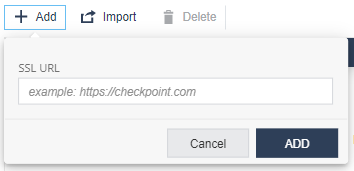
  3. Click Add.

    A pop-up window appears.

  4. In the SSL URL field, enter the URL.
  5. Click Add.
  6. To import a list of URLs, click Import and upload a .CSV file with URL names list and comments.
  7. To remove a URL from the list, select it and click Delete.
  8. To save the policy changes, click Save.