Prevents the download of malicious files on Android and iOS devices. It checks the file reputation against the ThreatCloud before it is downloaded on the mobile device. When the file emulation option is enabled, if the file is unknown, it is sent for file emulation to ThreatCloud that provides a verdict whether the file is safe or not.
-
Go to Policy and select a policy profile.
-
Click File > File Protection > File downloads.
-
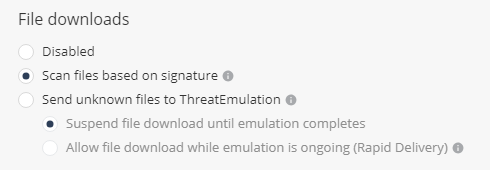
Select the file download method:
- Disabled - File download is disabled.
- Scan files based on signature - ThreatCloud assesses the file reputation based on the signature of the file.
- Send unknown files to ThreatEmulation - Files unknown to ThreatCloud are uploaded for file emulation.
- Suspend file download until emulation completes - Suspends download of unknown files until a verdict is available after emulation.Suspend file download until emulation completes - Suspends download of unknown files until a verdict is available after emulation.
- Allow file download while emulation is ongoing (Rapid Delivery) - Allows download of unknown files even if the verdict is not available.
-
To save the policy changes, click Save.
