
Avanan - Protect External
To create and configure the Avanan - Protect External rule:
-
To add a rule, click Add a rule and select Create a new rule.

-
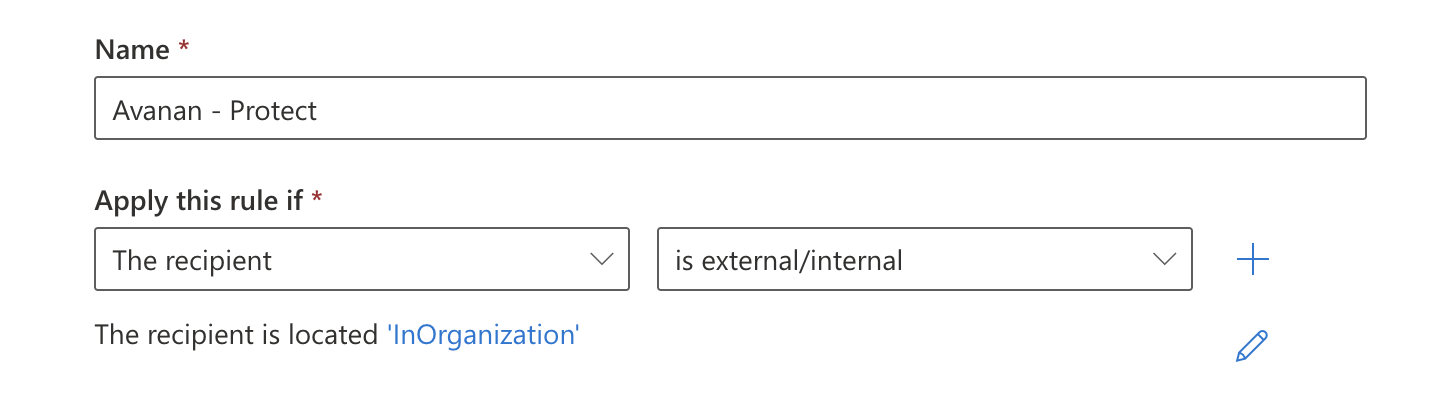
For Apply this rule if..., add this condition:
The sender is located outside the organization.
-
For Do the following..., add these two actions:
-
Modify the message properties:
In the first field, select Modify the message properties.
In the next field, select set the message header.
Click the first Enter text and enter
X-CLOUD-SEC-AV-InfoClick the second Enter header and enter this value:
{portal}, office365_emails, inline(replace "{portal}" with your portal name)
-
Redirect the message to: Use the following connector, select Avanan DLP Outbound connector.

In the first field, select Redirect the message to.
In the next field, select the following connector.
Select Avanan DLP Outbound connector and click Save.
-
-
For Except if..., add these two exceptions:
-
The message has an SCL greater than or equal to 5.

In the first field, select The message properties.
In the next field, select include an SCL greater than or equal to.
From the dropdown, select 5 and click Save.
-
Sender's IP address is in the range:
In the first field, select The sender.
In the next field, select IP address is in any of these ranges or exactly matches.
-
Enter the IP address, click Add and then click Save.
-
If your data residency is in the United States, enter this IP address:
18.97.17.224/2835.174.145.124
-
If your data residency is in Europe, enter this IP address:
3.40.131.0/2852.212.19.177
-
If your data residency is in Australia, enter this IP address:
13.211.69.23118.98.196.176/28
-
If your data residency is in Canada, enter this IP address:
15.222.110.9018.99.4.64/28
-
If your data residency is in India, enter this IP address:
3.109.187.9618.96.227.0/28
-
If your data residency is in United Kingdom, enter this IP address:
3.41.0.160/2813.42.61.32
-
If your data residency is in United Arab Emirates, enter this IP address:
3.29.194.12818.96.97.192/28
-
If your data residency is in Singapore, enter this IP address:
3.44.1.224/2818.99.40.64
-
Note:If you have other inbound connectors using IP addresses, add their IP addresses to this list.
-