Compromised Account (Anomaly) Detection
The Anomaly Detection engine detects behaviors and actions that seems abnormal when observed in the context of an organization and a user's historical activity. It analyzes the behavior using machine-learning algorithm that builds a profile based upon historical events including login locations and times, data-transfer behavior, and email message patterns. Anomalies are often a sign that an account is compromised.
When an anomaly is detected, a security event is generated providing the context and other information necessary for investigation. Depending on the Severity Level, the anomaly is categorized as Critical or Suspected.
-
Critical anomalies are events indicating a high probability for compromised accounts. These anomalies require investigation and validation from administrators and should be handled immediately.
Note:You can configure the Anomaly Detection engine to automatically block the detected compromised accounts. For more information, see Configuring Anomaly Detection Workflows.
-
Suspected anomalies are events that might indicate a compromised account and can be reviewed with a lesser sense of urgency.
Compromised accounts refer to anomalies (events) with a Critical severity level, while Suspected compromised accounts refer to anomalies with lower severity levels - High, Medium, and Low.
By default, for critical anomalies, the Anomaly Detection engine only sends email alerts to administrators. To configure the Anomaly Detection engine to not only send email alerts but also automatically block the detected compromised accounts, see Configuring Anomaly Detection Workflows.
Some organizations manage security alerts through dedicated mailboxes shared between different security team members or use them for integration with 3rd party solutions.
With Avanan, you can configure a dedicated mailbox for alerts on detected compromised accounts. To configure the mailbox, see Configuring Anomaly Detection Workflows.
To focus on high probability account takeover, do one of these:
-
On the Events page, filter the events by Type (Anomaly) and Severity Level (Critical).
-
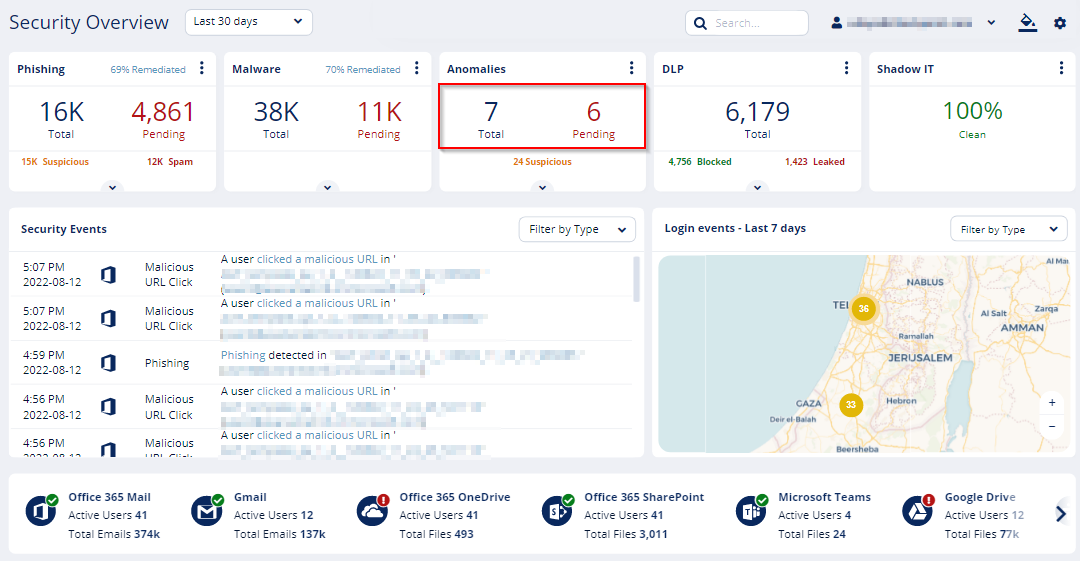
On the Overview page, click on the Anomalies card main indicators.
-
On the Overview page, under Security Events, click on Filter by Type and select Critical Anomalies.