Configuring Anomaly Detection Workflows

When Avanan detects a compromised or suspected compromised account, the administrator can configure the Anomaly Detection security engine to take automatic actions. To do that, the administrator must select the required workflow for different scenarios.

To configure Anomaly Detection workflows:

  1. Navigate to Security Settings > Security Engines.
  2. Click Configure for Anomaly Detection.
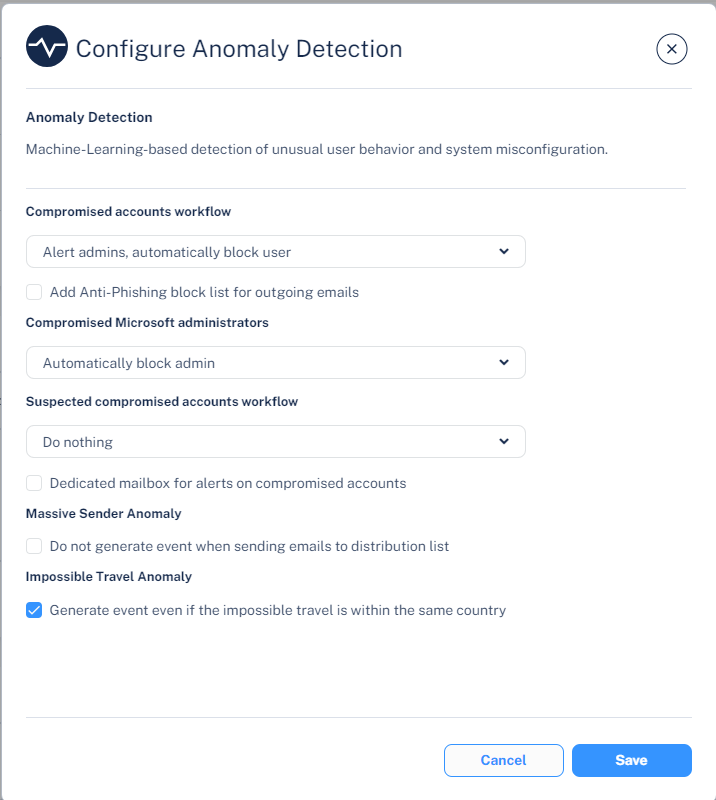
  3. Under Compromised accounts workflow, select the required workflow when critical anomalies (which indicates that an account is compromised) are detected.
    1. To send email alerts to the administrator and automatically block the compromised account, select Alert admins, automatically block user.
    2. To send only email alerts to the administrator, select Alert admins.
    3. To automatically block outgoing emails for compromised accounts, in the Compromised accounts workflow section, select the Add Anti-Phishing block list for outgoing emails checkbox.

      For more information, see Automatically Blocking All Outgoing Emails.

  4. Under Compromised Microsoft administrators, select the required workflow when compromised global admin accounts are detected.
    1. To block compromised global admin accounts, select Automatically block admin.
    2. To avoid blocking compromised global admin accounts, select Do nothing.
  5. To send email alerts when suspected anomalies (which indicates that an account may be compromised) are detected, under Suspected compromised accounts workflow, select Alert Admins.
  6. To configure a dedicated mailbox for alerts on compromised accounts:
    1. Select the Dedicated mailbox for alerts on compromised accounts checkbox.
    2. Under Dedicated Alert Mailbox, enter the email address.
  7. Click Save.

Notes:

  • To enable login events for Office 365 GCC environment, contact Avanan Support.

  • To create exceptions for anomalies, see Anomaly Exceptions.

  • Compromised accounts refer to anomalies (events) with a Critical severity level, while Suspected compromised accounts refer to anomalies with lower severity levels - High, Medium, and Low.

  • If you are using Microsoft Entra ID (formerly Azure AD) as the SAML/SSOIdentity Provider for your corporate assets, the users gets blocked from accessing all the assets including Microsoft 365.

  • Blocking a user account terminates all the active sessions associated with the account.

  • Blocking a Microsoft user account resets the account password and requires the user to set a new password when unblocking their account.