Appendix M: Configuring Postfix as an Internal SMTP Relay for Non‐TLS Senders to Avanan Cloud SMTP Relay
Overview
Avanan Cloud SMTP Relay accepts SMTP connections only when they are encrypted with TLS.
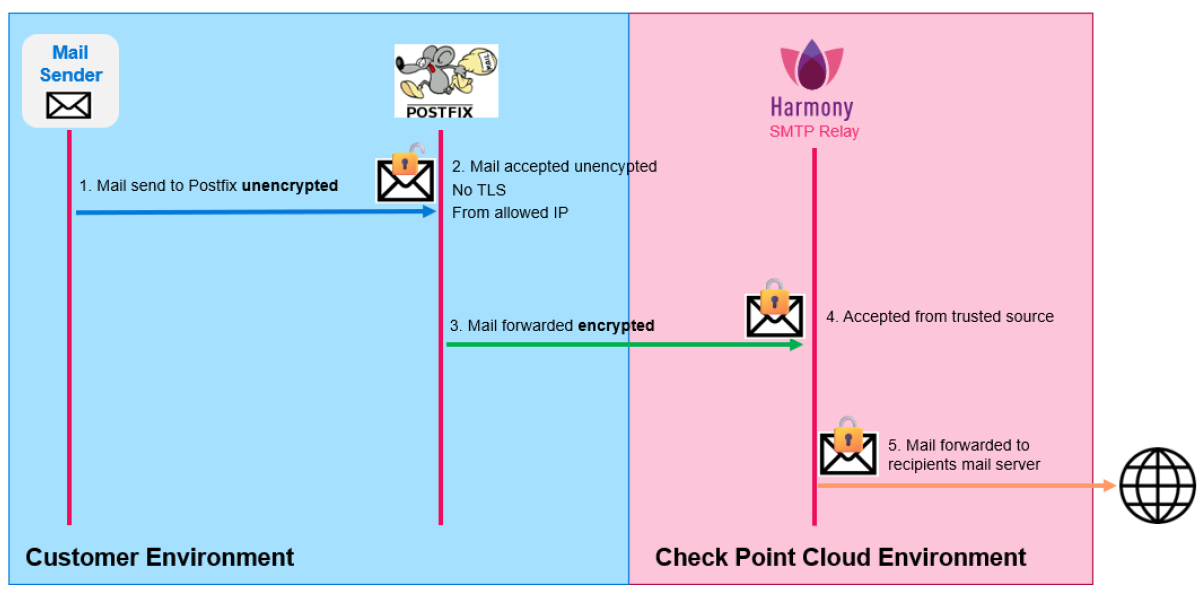
Some internal systems, applications, printers, scanners, or legacy services may need to send email through Avanan Cloud SMTP Relay, but may not support TLS encryption. In such cases, you can use an internal mail relay as an intermediary.
This guide explains how to configure Postfix on Linux as an internal SMTP relay. Postfix accepts SMTP connections from trusted internal senders that do not support TLS and securely forwards those email messages to Avanan Cloud SMTP Relay using a TLS-encrypted connection.
Postfix is a widely used open-source Mail Transfer Agent (MTA) that supports secure SMTP communication using TLS encryption. Its official documentation includes support for TLS-encrypted SMTP sessions.
Use Case
Use this configuration when an internal sender needs to send email through Avanan Cloud SMTP Relay but cannot establish a TLS-encrypted SMTP connection directly.
In this setup:
Non-TLS sender > Postfix internal relay > TLS-encrypted connection > Avanan Cloud SMTP Relay
The connection between the sender and Postfix may be unencrypted, but the connection from Postfix to Avanan Cloud SMTP Relay must use TLS encryption.
Security Considerations
Relay access is restricted to internal networks.
TLS is enforced for outbound traffic.
No open relay exposure.
Limitations
No TLS for inbound connections (intentional for legacy devices).
Trust model is network-based not identity-based.
Prerequisites
Before configuring Postfix as an internal SMTP relay, ensure that the following requirements are met:
-
Linux Server for the Internal Relay
A Linux server is required to host Postfix. Deploy the Linux server inside the customer's trusted internal network.
-
Software Requirements
Postfix
Avanan Cloud SMTP Relay
-
Postfix Installation
Install and configure Postfix as the local SMTP relay.
-
Network Access to Avanan Cloud SMTP Relay
The Postfix server must be able to make outbound SMTP connections to Avanan Cloud SMTP Relay on the required SMTP port.
-
Trusted Internal Senders only
Allow only approved internal systems to send email through the Postfix relay. The relay must not be exposed as an open relay.
-
TLS Support on the Postfix Server
Configure Postfix to forward all outbound email to Avanan Cloud SMTP Relay using TLS encryption.
-
IP-Based Authentication
Avanan Cloud SMTP Relay currently authenticates the relay based on the source IP address of the Postfix server. The public outbound IP address used by the Postfix server must be allowed in the Avanan Cloud SMTP Relay service.
Note:Additional SMTP authentication mechanisms (such as username/password authentication) are planned and will be documented when available.
-
Basic Linux Administration Knowledge
This guide assumes familiarity with:
Installing Linux packages
Editing configuration files
Restarting services
Reviewing system logs
Architecture