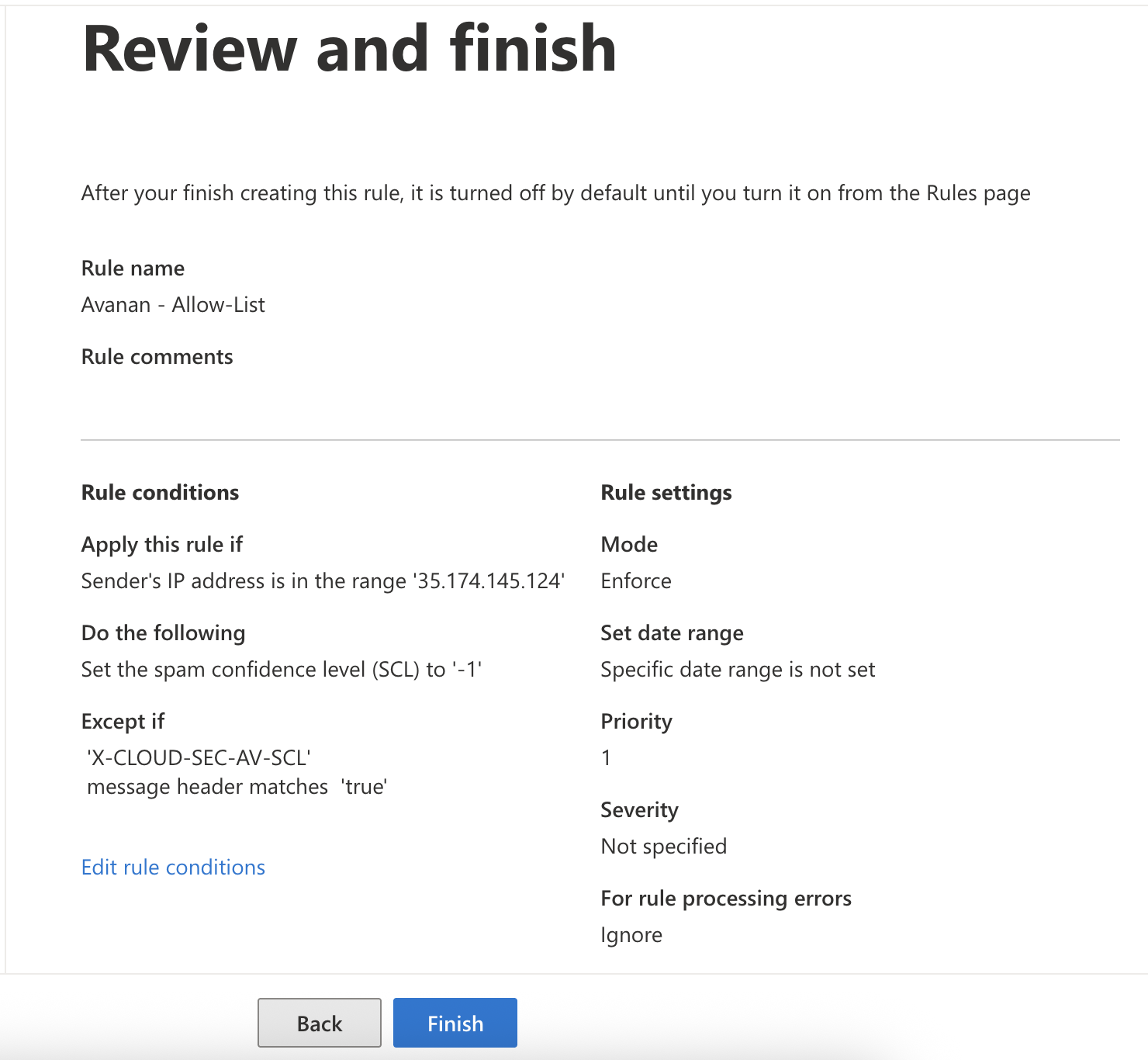
Avanan - Allow-List
To configure the Avanan Allow-List rule:
-
In the Apply this rule if... field, sender's IP address:
-
In the first field, select The sender.
-
In the next field, select IP address is in any of these ranges or exactly matches.
-
Enter the IP address, click Add and then click Save.
-
If your data residency is in the United States, enter this IP address:
18.97.17.224/2835.174.145.124
-
If your data residency is in Europe, enter this IP address:
3.40.131.0/2852.212.19.177
-
If your data residency is in Australia, enter this IP address:
13.211.69.23118.98.196.176/28
-
If your data residency is in Canada, enter this IP address:
15.222.110.9018.99.4.64/28
-
If your data residency is in India, enter this IP address:
3.109.187.9618.96.227.0/28
-
If your data residency is in United Kingdom, enter this IP address:
3.41.0.160/2813.42.61.32
-
If your data residency is in United Arab Emirates, enter this IP address:
3.29.194.12818.96.97.192/28
-
If your data residency is in Singapore, enter this IP address:
3.44.1.224/2818.99.40.64
-

-
-
For the Do the following... field, select .
-
In the first field, select The message properties.
-
In the next field, select set the spam confidence level (SCL).
-
Select Bypass spam filtering and click Save.

-
-
For the Except if... field, select A message header matches these text patterns.

-
In the first field, select The message header.
-
In the next field, select matches these text patterns.
-
Click the first Enter text, enter
X-CLOUD-SEC-AV-SCLand click Save. -
Click the second Enter text, enter the value true, click Add and then click Save.
-
-
In the Review and finish window, verify the settings and click Finish.