
Webhook Parameters - Mapping Webhook Payload Fields
This topic explains how to map incoming webhook payload fields to the expected structure using Webhook Parameters. It describes scenarios where field names or formats differ from the Example Output.
When configuring a webhook:
-
The automation's trigger step may include an Example Output, which defines the expected data structure for subsequent steps.
-
In rare cases, the webhook payload sent by the third-party system does not match the format expected by Playblocks.
-
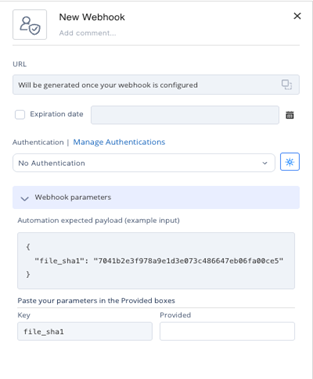
Use Webhook Parameters to map fields from the incoming webhook payload to the fields defined in the Example Output:
 Note:
Note:If mapping is not defined, the system assumes identical field names as shown in the example output.
-
Mapping ensures that the automation receives the correct data in the correct format.
-
Example Scenario
-
The Example Output includes a field named file_sha1.
-
A later step in the automation relies on this field.
-
The third-party system sends a payload in these format:
{
              "data": {
              "sha1": "7041b2e3f978a9e1d3e073c486647eb06fa00ce5"
              }
              }
-
-
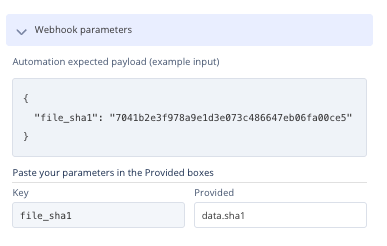
Since the incoming payload uses a different structure and field name, create a mapping so the automation receives the value in the expected file_sha1 field.
-
Steps to Create a Mapping
-
Go to Webhook Parameters in the webhook configuration.
-
Map the incoming field (data.sha1) to the expected field (file_sha1).
-