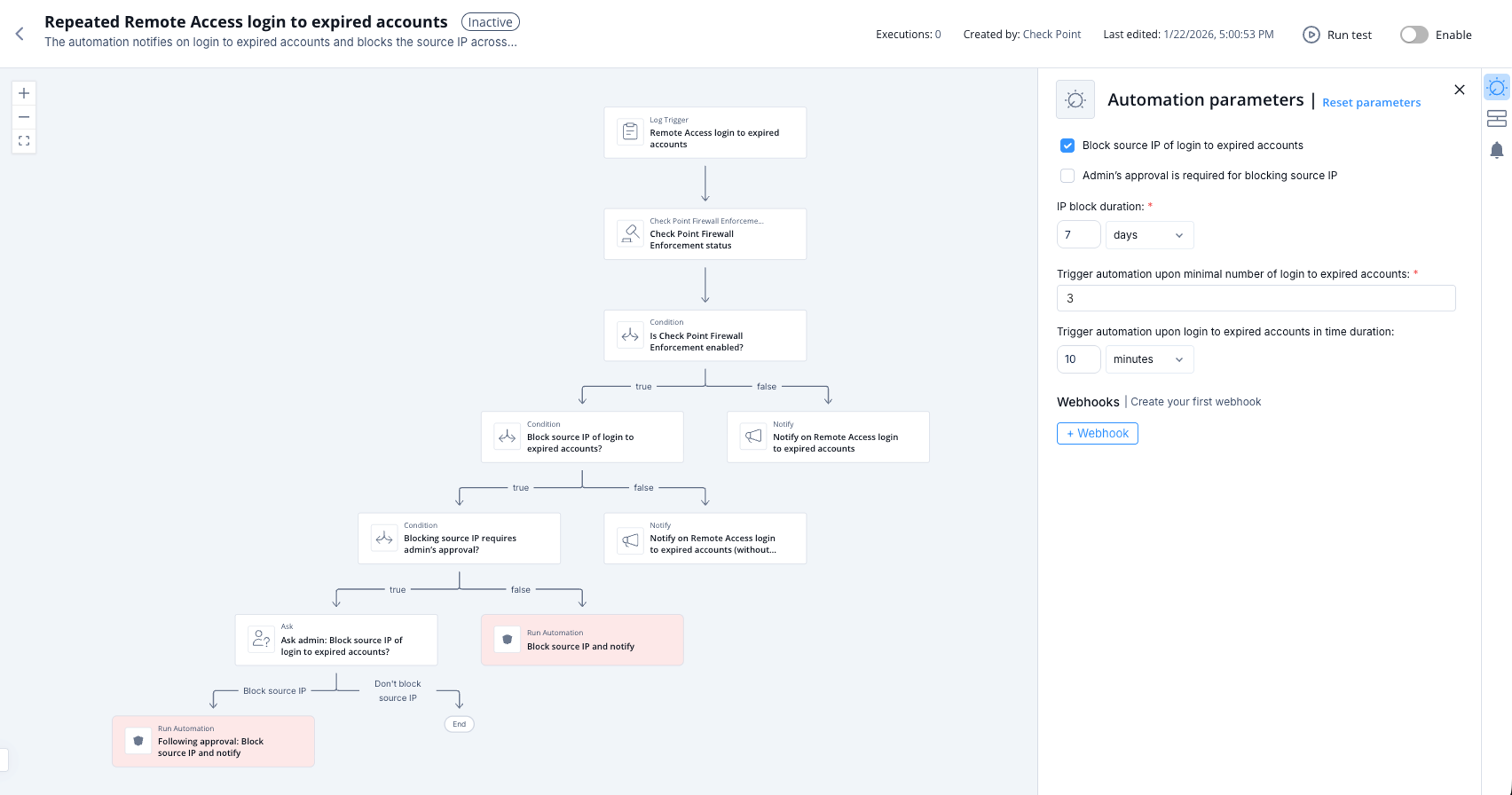
Repeated Remote Access login to expired accounts
This automation detects login attempts to expired accounts and blocks the source IP address on all Check Point Firewall. The notification includes information about the users who failed to log in, the total number of failed login attempts within a specified time period, and the source IP address. You can configure the automation parameters to set the login failure threshold, the IP address block duration, whether the automation blocks the IP address automatically or after administrator approval, and other settings.
Supported Product
Check Point Security Management Server
Parameters
|
Block source IP of login to expired accounts |
Select the checkbox to block the source IP of repeated login failures. |
|
Admin's approval is required for blocking source IP |
Select the checkbox if admin's approval is required for blocking source IP. |
|
IP block duration |
Set the IP block duration. |
|
Trigger automation upon minimal number of login to expired accounts |
Set the minimal number of login to expired accounts to trigger the automation. |
|
Trigger automation upon login to expired accounts in time duration |
Set the time duration to count the login to expired accounts. |
Trigger
When there are repeated Remote Access login to expired accounts.
To view the example of this log, click Run.
Flow