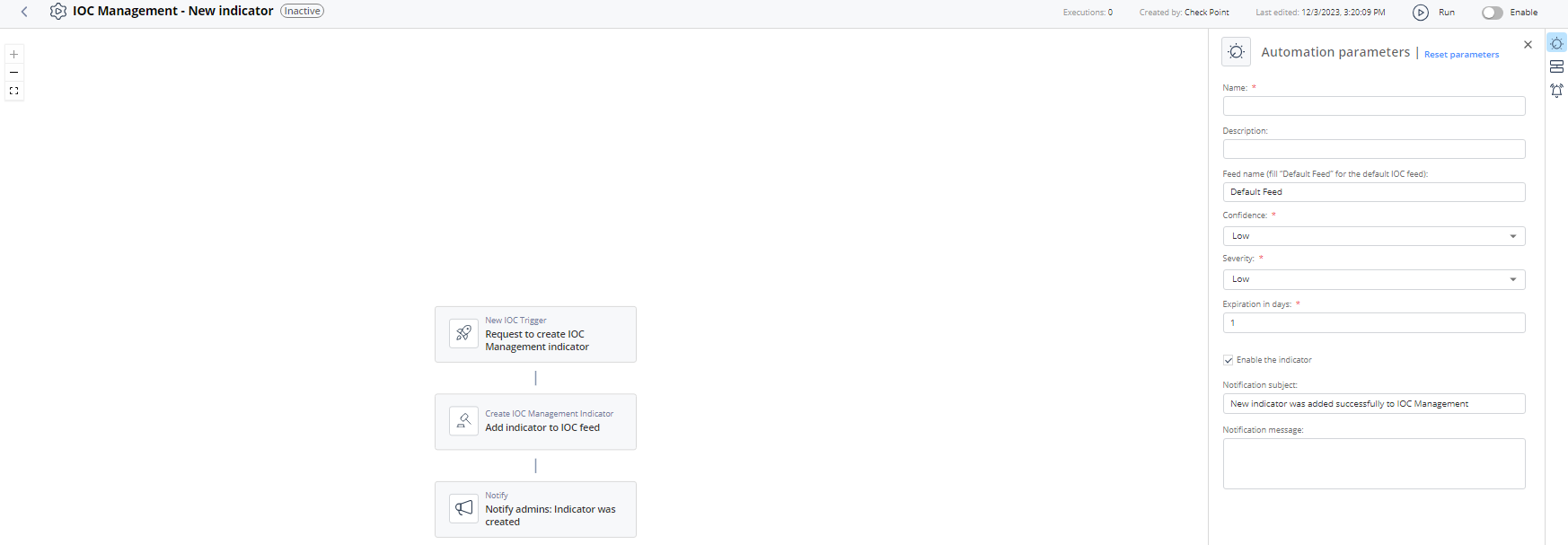
IOC Management - New indicator
The automation adds a new indicator to an IOC feed.
Supported Product
XDR IOC Management
Parameters
| Name | Enter a name. |
| Description | (Optional) Enter a description for the IOC. |
| Feed name | Enter the feed name. Make sure the feed name already exists in IOC Management. The default is Default Feed. |
| Confidence | Select the confidence level of the IOC from the list. Default level is Low. |
| Severity | Select the severity level of the IOC from the list. Default level is Low. |
| Expiration in days | Set the expiration period for the automation. |
| Enable the indicator | Select the checkbox to enable the indicator. |
| Notification subject | Enter a subject for notification you receive through a configured communication tool. |
| Notification message | Enter the text for the notification you receive through a configured communication tool. |
Trigger
Matching IOC management new indicator.
To view the example of this log, click Run.
Flow