Block external IP
Supported Product
Check Point Security Management Server
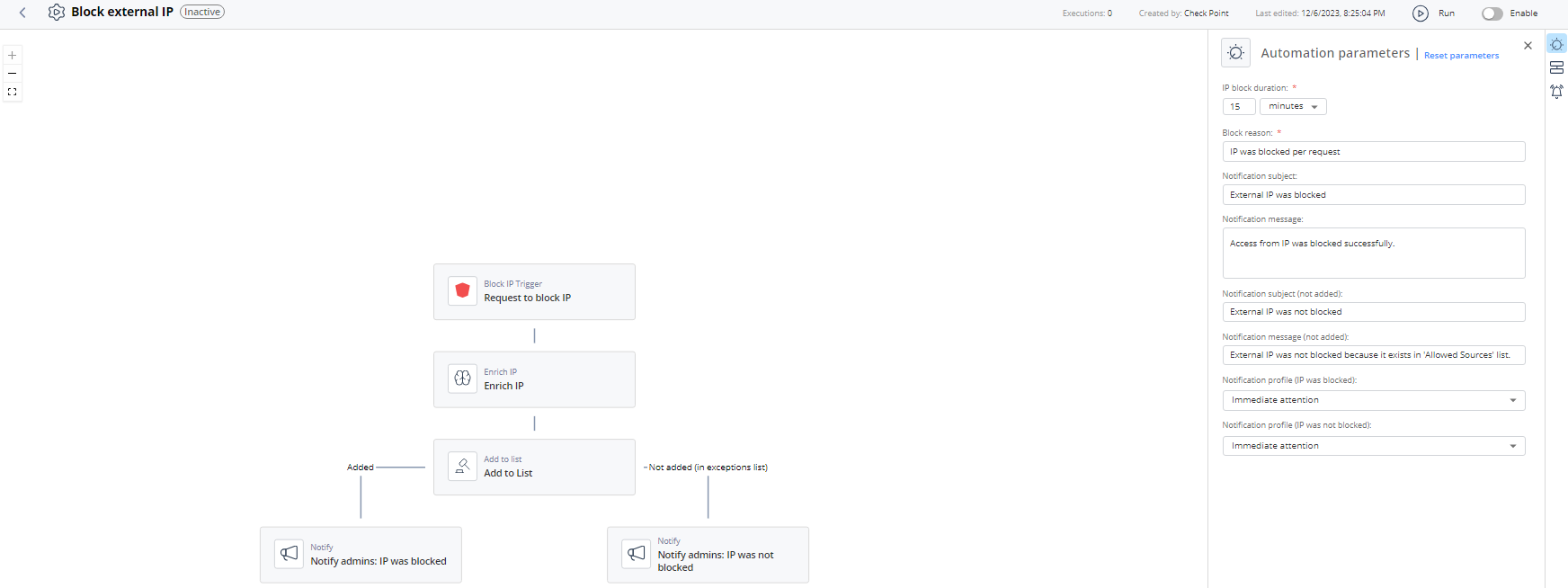
The automation blocks the incoming access from external IP address on the Check Point Firewall across the organization.
Parameters
| IP block duration | Set the expiration period for the automations that are executed automatically (without Administrator's approval). |
| Block reason | Enter the reason for blocking IP. |
| Notification subject | Enter a subject for a notification you receive through a configured communication tool. |
| Notification message | Enter the text for a notification you receive through a configured communication tool. |
| Notification subject (not added) | Enter the subject for the notification that is sent to the Administrator if the IP address is not quarantined as it is listed in the Allowed Sources List. |
| Notification message (not added) | Enter the message for the notification that is sent to the Administrator if the IP address is not quarantined as it is listed in the Allowed Sources List. |
| Notification profile (IP was blocked) | Select a notification profile to send notification to Administrator if the IP address is blocked. For more information, see Notifications. |
| Notification profile (IP was not blocked) | Select a notification profile to send notification to Administrator if the IP address is not blocked as it is in the Allowed Sources List. For more information, see Notifications. |
Trigger
Matching block IP.
To view the example of this log, click Run.
Flow