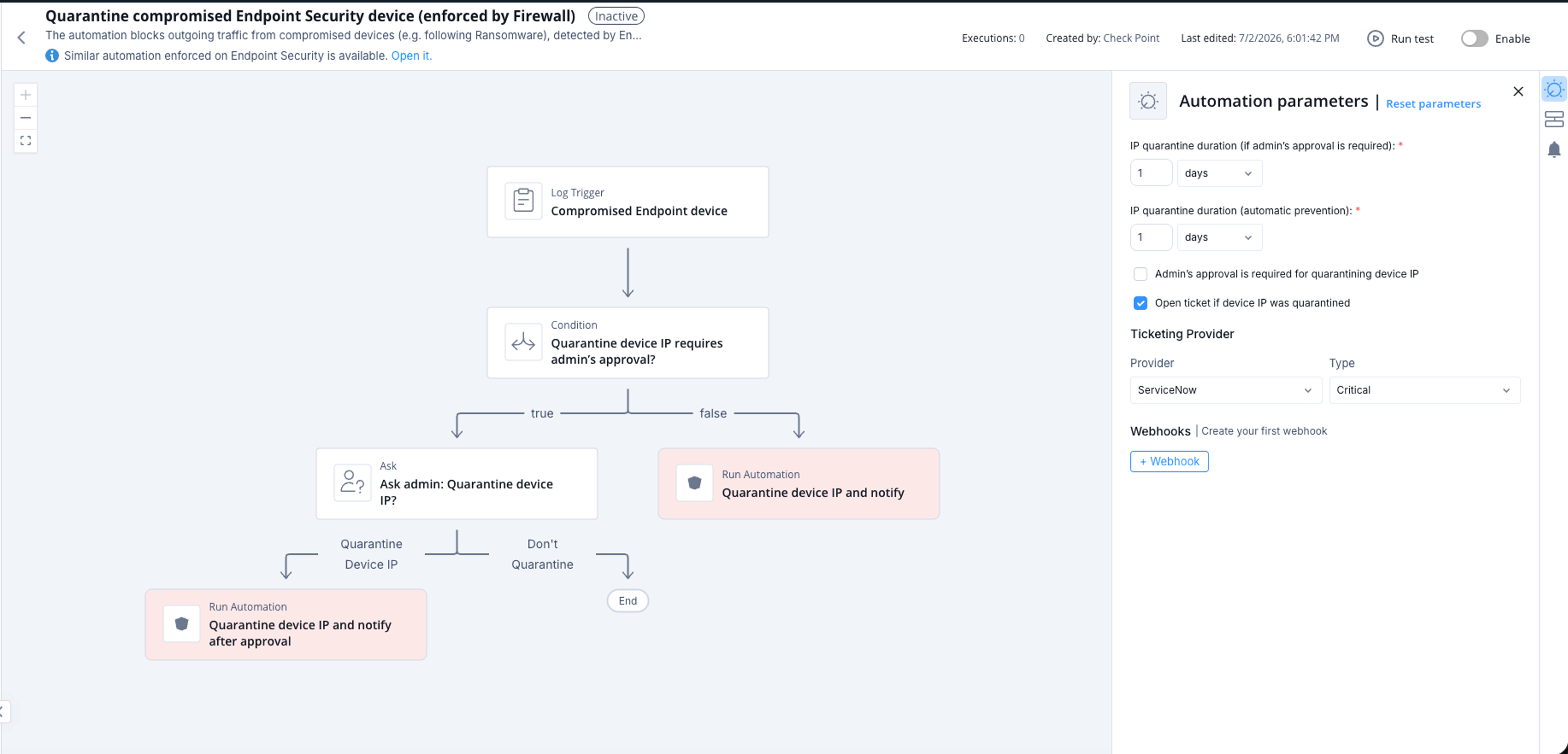
Quarantine compromised Endpoint Security device (enforced by Firewall)
This automation blocks outgoing traffic from compromised devices detected by Endpoint Security. For example, Endpoint Security can detect a compromised device after a ransomware attack.
The automation quarantines the device IP address on the Check Point Firewall. This action prevents lateral movement and communication with Command and Control (C&C) servers.
Supported Product
- Check Point Security Management Server
-
Endpoint Security
Parameters
|
IP quarantine duration (if admin's approval is required) |
Sets the quarantine duration. This parameter applies only when Admin's approval is required for quarantining device IP is selected. If the approval request expires, the automation does not quarantine the IP address. |
|
IP quarantine duration (automatic prevention) |
Sets the quarantine duration when the automation runs without administrator approval. The default duration is 1 day. |
|
Admin's approval is required for quarantining device IP |
Select this checkbox to require administrator before the automation quarantines the device IP address. Check Point recommends that you leave this checkbox unselected. |
|
Open ticket if device IP was quarantined |
Select this checkbox to open a ticket each time the automation quarantines a device IP address. |
| Ticketing Provider | Select the ticketing connector that opens the ticket. This parameter applies only when Open ticket if device IP was quarantined is selected. |
Trigger
The automation starts when Endpoint logs match high-confidence Anti-Ransomware or Behavioral Guard detections:
product_family:"Endpoint" AND confidence_level:"High" AND ((product:"Anti-Ransomware" AND severity:("Medium" OR "High" OR "Critical")) OR (product:"Behavioral Guard" AND severity:("High" OR "Critical")))The pre-execution check skips source IP addresses that already exist in the Quarantined Sources list.
To view the example of this log, click Run.
Flow
- The automation identifies a compromised Endpoint device from Endpoint logs.
- The automation checks whether Admin's approval is required for quarantining device IP is selected.
- If selected, the automation sends an Ask notification to the administrator. The notification uses the Immediate attention profile and includes the device context.
- If the administrator selects Don't Quarantine, the automation takes no action.
- If the administrator does not respond within one hour, the request expires and the automation takes no action.
- If Admin's approval is required for quarantining device IP is not selected, the automation quarantines the device IP address automatically. The quarantine uses the duration configured in IP quarantine duration (automatic prevention).
- After the automation quarantines the device IP address, it sends a notification through the Immediate attention profile.
- If Open ticket if device IP was quarantined is selected, the automation opens a ticket with the selected Ticketing Provider.
- If the source IP address already exists in the Allowed Sources list, the automation does not quarantine the IP address. Instead, the automation sends a notification that the IP address was not quarantined.
A similar automation is enforced on Endpoint Security: Isolate compromised Endpoint Security device (enforced by Endpoint).