
Password Protected Attachments Protection
When password-protected attachments are detected, Avanan attempts to extract the password using various techniques such as searching for the password in the email body. If the password is found, Avanan uses the password to decrypt the file and inspect it for malware.
If the password is not found, the administrator can select any one of these workflows.
Password Protected Attachments Workflow
These workflows apply only for the incoming and internal emails.
| Workflow | Description |
|---|---|
User receives the email with a warning |
The detected email is delivered to the user with a notification inserted in the body of the email. |
Require the end-user to enter a password |
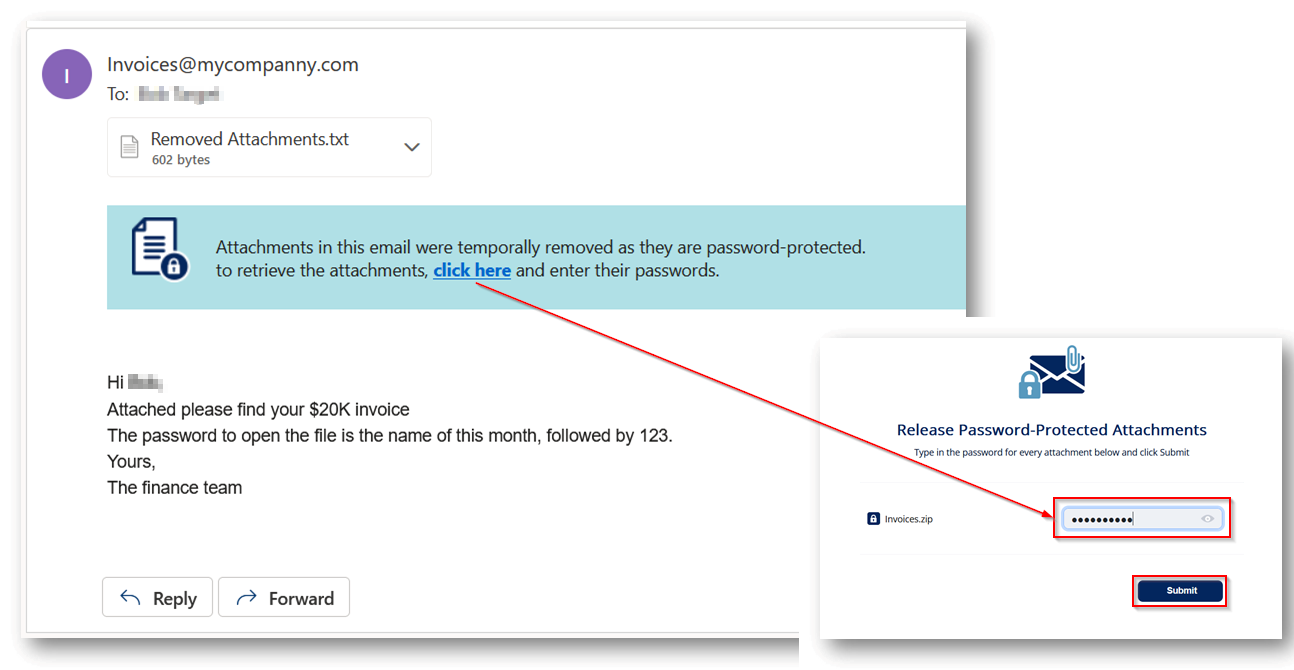
The attachment is removed temporarily and a warning banner is added to the email along with a link to enter the password. After the password is entered, the Anti-Malware engine scans the attachment. If the Anti-Malware engine finds the attachment as clean, the original email with the original password-protected attachment gets delivered to the original recipients of the email.
Note:
|
Quarantine. User is alerted and allowed to restore the email |
The email is automatically quarantined and the user is notified about the quarantine. Using the link in the email, the user can release the attachment. The original email and attachment will be immediately delivered back to the inbox. |
Quarantine. User is not alerted (admin can restore) |
The email is automatically quarantined with no user notification. The administrator can restore the email. |
Trigger suspected malware workflow |
The email follows the workflow configured for Suspected Malware. |
Do nothing |
The attachment will be considered as clean. Note:
This workflow flags only the attachment as clean (not malicious). The email can still be found to be malicious for various reasons. For example, if there are other malicious attachments in the email, if the Anti-Phishing engine flagged the email as phishing for other reasons than the attachment being malicious, if there is a DLP violation in the email and more. |
To add allow-list for password-protected attachments from specific email addresses or domains, see Password-Protected Attachments Allow-List.
For more information on who receives the restored emails, see Who Receives the Emails Restored from Quarantine.