Click-Time Protection Policy

To configure Click-Time Protection policy:

  1. Navigate to Policy.
  2. Click Add a New Policy Rule.
  3. Select the desired SaaS application under Choose SaaS drop-down.
  4. Select Click-Time Protection under Choose Security drop-down and click Next.
  5. Choose Scope for the policy.
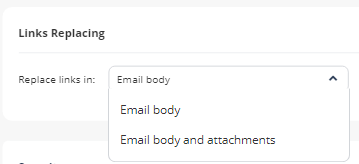
  6. Under Links Replacing, choose where to replace the links for the email.
    Email body

    Email body and attachments
  7. Under Severity, select the severity of the events generated by Click-Time Protection security engine.

    Auto

    Critical

    High

    Medium

    Low

    Lowest

  8. Click Save and Apply.
Note:

For more details about workflow and additional settings, see Click-Time Protection.