
Configure DNS Records
The detection of these DNS records can take up to 72 hours.
Configure the Relay MX Record
You must configure an MX record in your domain's DNS to enable secure mail delivery through the Avanan relay infrastructure.
To configure the relay MX record:
-
Go to Security Settings > Relay > Domains.
-
Click the
 icon for the required domain.
-
Select Configure MX.
-
In the Set Up Relay MX pop-up that appears, follow the instructions below:
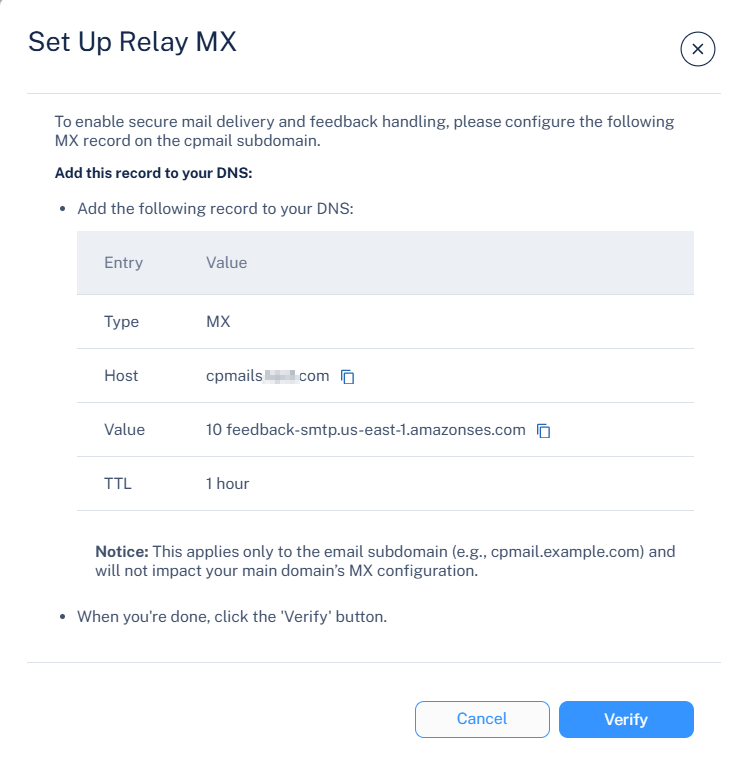
DNS Record Example:
Entry
Value
Type
MX
Host
cpmails.test.com
Value
Add the value based on your region, see Supported Regions
TTL
1 hour
Note:This configuration applies only to the relay subdomain (for example, cpmail.example.com) and does not modify your main domain's MX record.
-
After the record is added to your domain's DNS, click Verify to confirm the configuration.
Supported Regions
Region |
Value |
|---|---|
United States |
|
Asia Pacific |
|
Europe |
|