
Configure a Relay Source
Adding a New Relay Source
Administrators can add, modify, or remove relay sources that specify the sending systems or IP addresses permitted to connect to the SMTP relay.
- Access the Avanan Administrator Portal.
- From the left navigation panel, go to Security Settings > Relay > Relay Sources.
- Click Add Relay Sources.
-
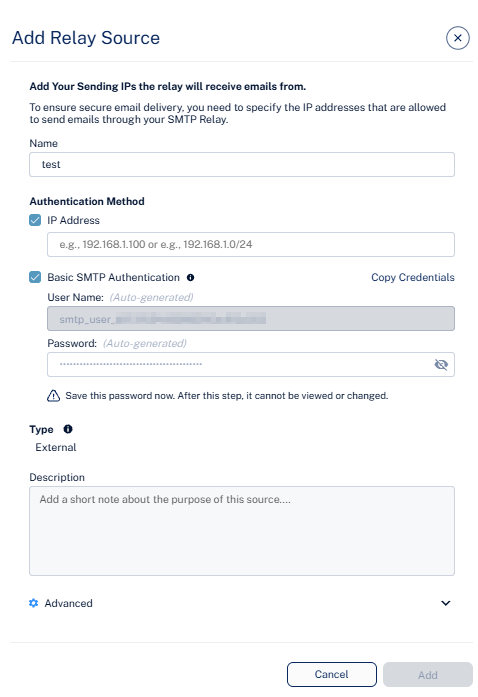
In the Add Relay Source pop-up that appears, configure the following fields as required.
-
In the Name field, enter a descriptive identifier for the relay source.
For example, Invoice Server, CRM Platform, and Internal Relay Gateway.
-
Configure the Authentication Method section.
See Cloud SMTP Relay.
-
In the IP field, enter your sending IP address or network range (CIDR format).
For example, 192.168.1.100 or 192.168.1.0/24.
-
To authenticate using SMTP username and password, select the Basic SMTP Authentication checkbox.
-
By default, the User Name and Password are generated automatically.
-
To regenerate new credentials, click the eye icon in the Password field and then click Re-Generate. The system generates new credentials.
Note:Save the password immediately after it is generated. After this step, you cannot view or change it.
-
To copy the credentials, click Copy Credentials.
Note:If both IP-based authentication and Basic SMTP Authentication options are selected, the system grants access only when both the source IP address and the authentication credentials pass validation.
-
-
In the IP field, enter your sending IP address or network range (CIDR format).
-
In the Type section, review the default value.
By default, the system specifies External, which means the relay source will send messages to recipients outside your organization.
-
(Optional) In the Description field, enter the required description about the relay source purpose or usage.
For example, Marketing campaign emails, Finance system alerts.
-
Expand the Advanced section.
-
TLS Version - Review the configured TLS version.
The version is set to TLS 1.3 and ensures encrypted email transmission between the relay and the recipient servers.
Note:-
Supported SMTP ports: 25, 465 or 587 (all connections require TLS).
-
Avanan supports both TLS 1.2 and TLS 1.3 to accept messages from the sending server.
If your environment includes legacy systems that do not support modern TLS versions, you can add a secure TLS adapter:
-
Option 1 - TLS proxy/server: Deploy a small server that accepts SMTP from the legacy system and then connects to the relay using TLS 1.2 or TLS 1.3.
-
Option 2 - Firewall / gateway with TLS termination: Use a firewall or gateway that terminates TLS and forward SMTP traffic from your internal systems to the relay over TLS 1.2 or TLS 1.3.
In both cases, TLS is enforced on the connection to our relay, and the unencrypted or older-protocol segment remains limited to your internal network and is controlled by your own security policies.
-
-
Preserve original headers? - Review the default setting.
By default, No is enabled, meaning original message headers from the internal sender are retained and enable identification of the internal sending server, but require valid SPF, DKIM, and DMARC alignment.
-
TLS Version - Review the configured TLS version.
- Click Add.