
Monitoring User Interactions with Phishing Simulations
The Security Training Dashboard shows an overview of training completion and phishing simulation performance for organization members using widgets, charts, and tables. It also shows individual training statuses and user details, enabling administrators to analyze the organization's security awareness and readiness against phishing threats.
To view the Dashboard page, click Security Training > Dashboard.
To select a time frame for the Dashboard, select an option from the dropdown next to Dashboard at the top of the page.
Last 24h
Last 7 days
Last 30 days
Last 12 months
Custom
To export the details to a PDF, click Export to PDF.
Overall Training Progress
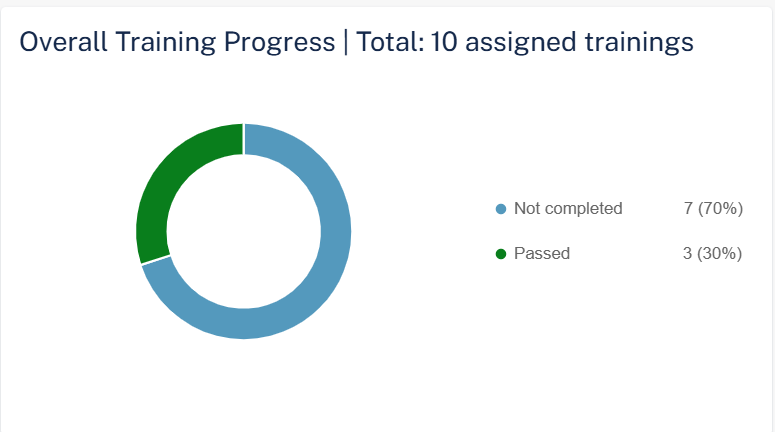
The Overall Training Progress widget shows the number of trainings assigned and their status in the selected time frame.
-
Passed
-
Failed
-
Not Completed
To view specific assigned trainings, click the relevant field in the widget, and the system shows the filtered trainings on the Users page.
Phishing Simulation Overview
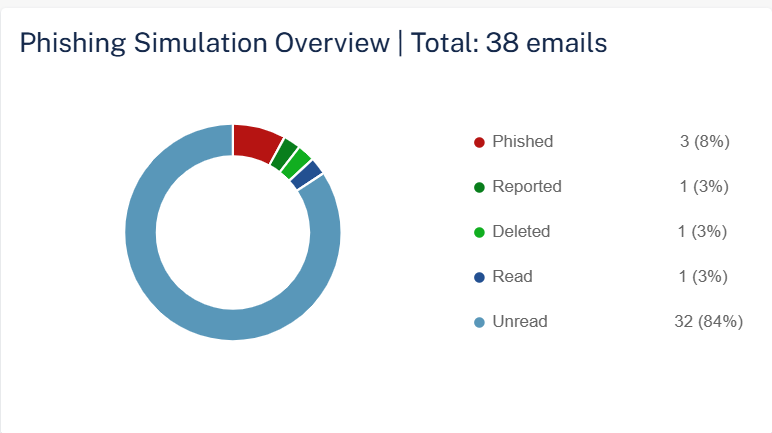
The Phishing Simulation Overview widget shows the number of phishing simulation emails sent and their status in the selected time frame.
-
Unread
-
Read
-
Deleted
-
Reported
-
Phished
-
Clicked
-
Scanned QR Code
-
Replied
-
Forwarded
-
Called unknown number
-
Shared data
-
To view specific phishing simulations, click the relevant field in the widget, and the system shows the filtered phishing simulations on the Users page.
Training Compliance Level Over Time (Entire Organization)
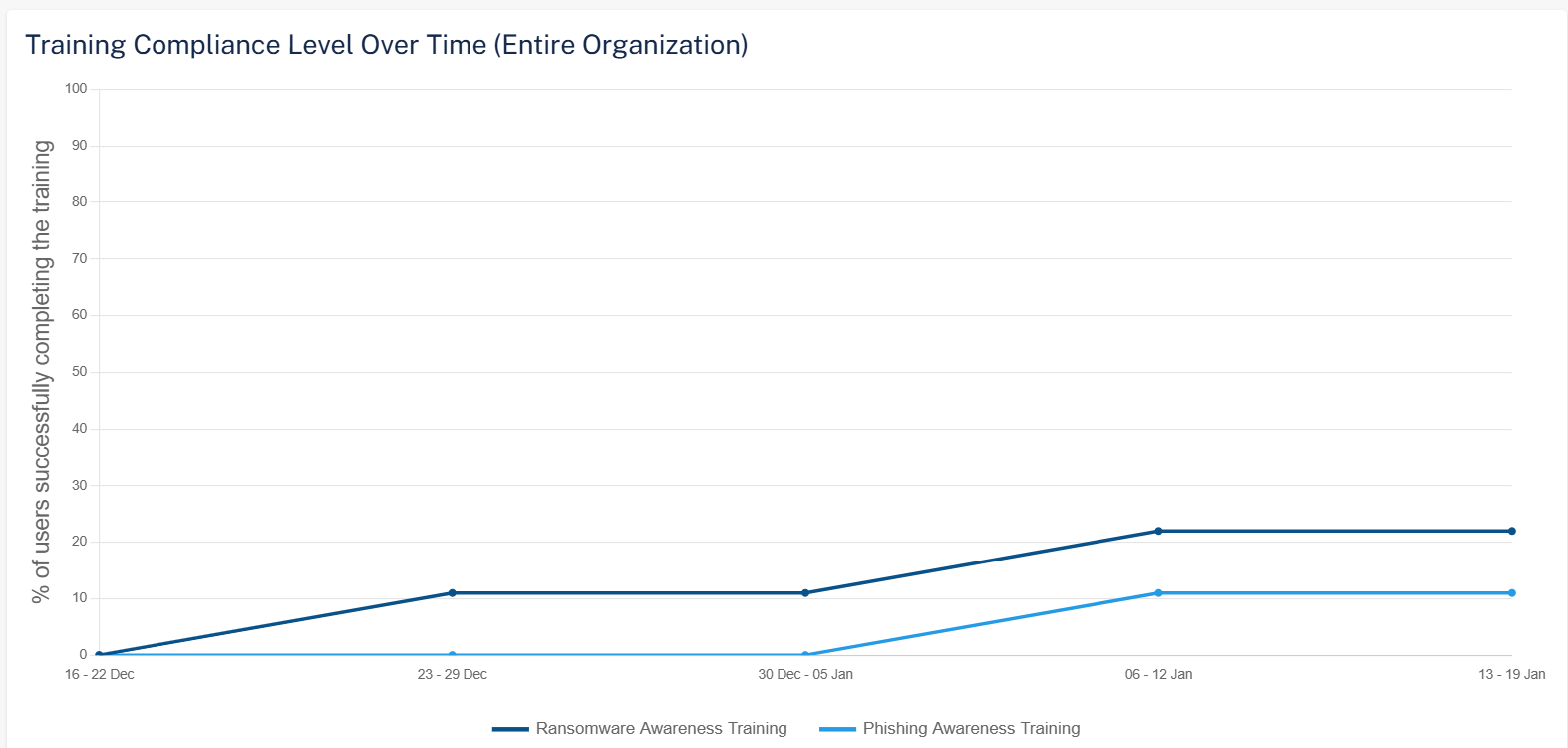
The Training Compliance Level Over Time (Entire Organization) widget shows the percentage of users in the organization who have completed the training in the selected time frame.
Phishing Simulation Emails Sent
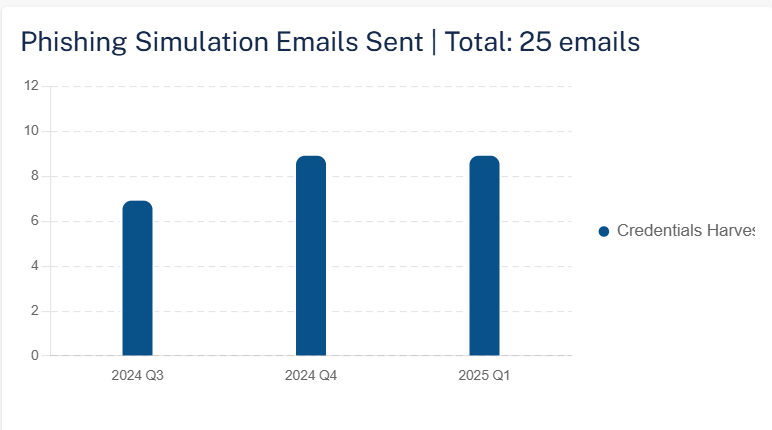
The Phishing Simulation Emails Sent widget shows the total number of phishing simulation emails sent and their status in the selected time frame.
Phishing Simulation by Attack Type

The Phishing Simulation by Attack Type widget shows the number of phishing simulation emails sent based on the attack type in the selected time frame. To view specific phishing simulation details based on the attack type, click the relevant field in the widget, and the system shows the filtered phishing simulations by attack type on the Users page.
Interaction Patterns of Phished Users
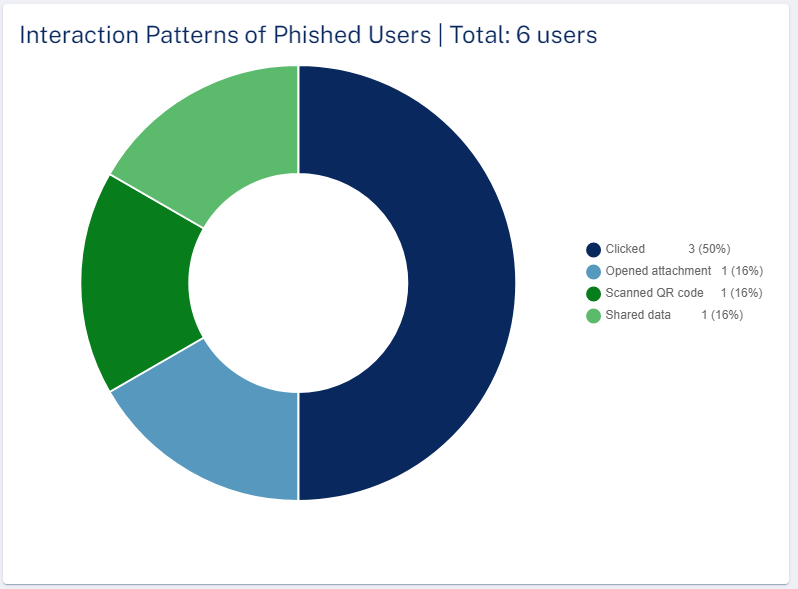
The Interaction Patterns of Phished Users widget shows the total number of phished emails and their interaction status in the selected time frame. To view specific phished emails and their interactions, click the relevant field in the widget, and the system shows the filtered interactions of phished users on the Users page.
Phishing Simulation - Failure Rate Over Time
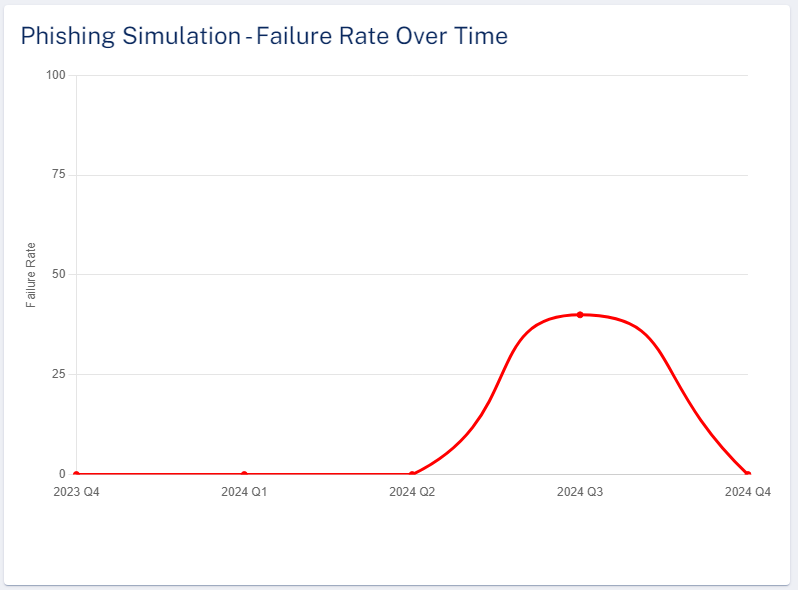
The Phishing Simulation - Failure Rate Over Time widget shows the percentage of emails that have failed the simulation in the selected time frame.
Top Phished Departments

The Top Phished Departments widget shows the top ten departments in the organization with the most phished users in the selected time frame. To view specific department in the organization with the most phished users, click the relevant field in the widget, and the system shows the filtered departments on the Users page.
Top Phished Users
The Top Phished Users table shows the users that are phished more times in the selected time frame.
Column |
Description |
|---|---|
Name |
Name of the user in the organization. |
Title |
Job title of the user in the organization. |
Department |
Department the user belongs to within the organization. |
Failures |
Number of phishing emails opened. |