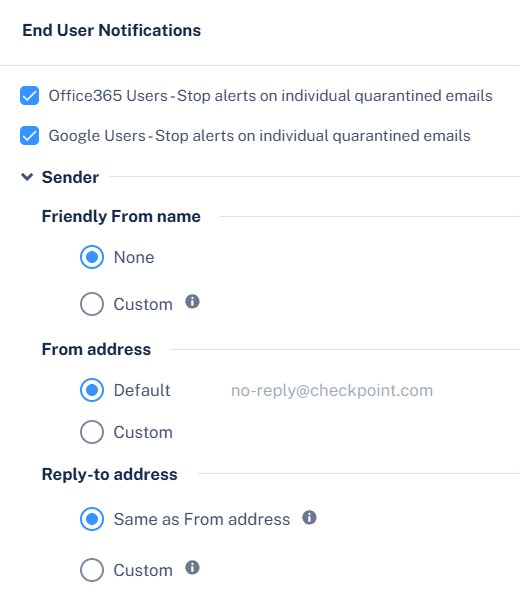
To notify end users when their quarantine restore requests are rejected:
-
Go to Security Settings > User Interaction > Quarantine.
-
In the End User Notifications section, configure the required notifications.
-
For Office 365 users, to stop sending alerts for individual quarantined emails, select Office 365 Users - Stop alerts on individual quarantined emails (recommended) checkbox.
-
For Google users, to stop sending alerts for individual quarantined emails, select Google Users - Stop alerts on individual quarantined emails (recommended) checkbox.
-
To configure the sender email address for notifications, do these:
-
Friendly-From name
-
If no friendly-from name is required, select None.
-
To use a customized name, select Custom and enter the sender name.
-
From address
-
Reply-to address
-
To use From address as the Reply-to address, select Same as From address.
-
To use a custom email address, select Custom and enter the email address.
-
Click Save and Apply.
-
Go to Security Settings > SaaS Applications
-
To configure the notification for Office 365 Mail, click Configure for Office 365 Mail.
-
To configure the notification for Gmail, click Configure for Gmail.
-
Scroll-down to Advanced and edit these templates.
-
Decline message subject
-
Decline message body