
Smart Banners for Non-Clean Emails
Avanan allows administrators to apply Smart Banners to emails delivered to end users, even when those emails are not classified as clean.
Previously, the system applied Smart Banners only to clean emails, leaving potentially risky but delivered messages, such as spam, graymail, suspected phishing, or emails with password-protected attachments, without contextual warnings. This capability now allows Smart Banners to display contextual warnings on these delivered messages, helping users identify potential risks and act more safely.
With this enhancement, Smart Banners can now be included in these emails regardless of their delivery location (Inbox, Junk, or other folders). The banners provide clear, in-message guidance at the point of interaction, improve user awareness, and reduce the risk of engaging with potentially harmful content.
To enable this feature, administrators can configure it within the email policy workflows. To do that:
-
Access the Avanan Administrator Portal.
-
From the left navigation panel, go to Policy.
-
Open an existing Threat Detection policy for Office 365 Mail or Gmail, or create a new one.
-
Select a workflow that delivers emails to end users and select the Deliver with Smart Banners checkbox.
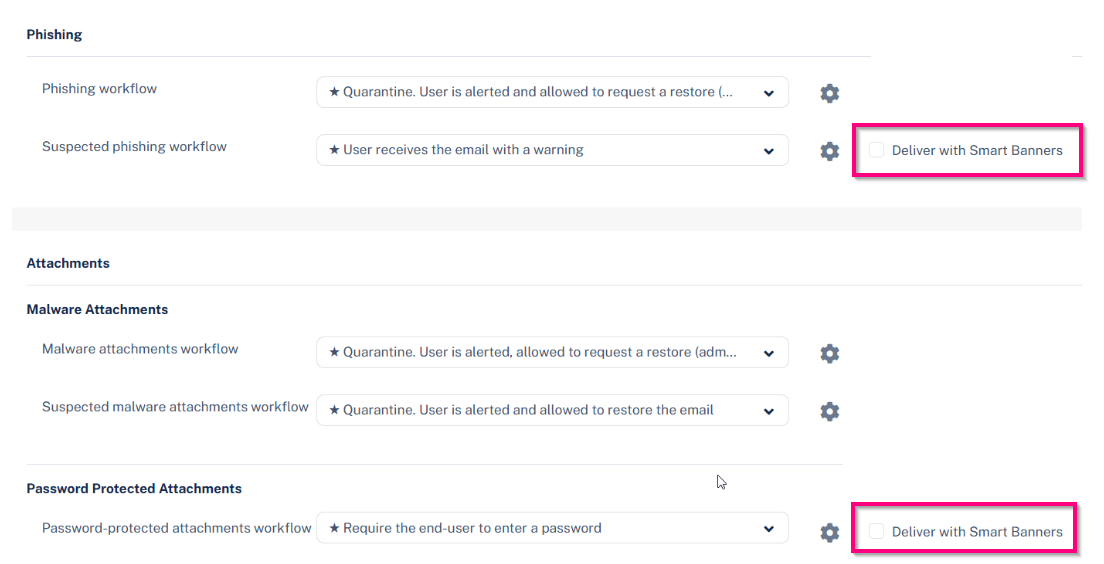
-
Click Save and Apply.
Supported Workflows for Smart Banners
| Workflow | Supported Workflows |
|---|---|
Phishing workflow |
|
Suspected phishing workflow |
|
Malware attachments workflow |
|
Suspected malware attachments workflow |
|
Password-protected attachments workflow |
|
Spam workflow |
|
Graymail workflow |
|