
Threat Detection Policy for Internal Emails
Internal emails refer to emails exchanged between employees of an organization. For internal emails, Avanan applies the threat detection policy workflows of incoming emails.
By default, even if the Threat Detection policy is set to Prevent (inline) mode, it only applies to incoming emails. Internal emails are inspected in Detect and Remediate protection mode, see Fallback Workflows for Internal Traffic.
Enabling Inline Protection for Internal Emails (Office 365 Mail)
-
Access the Avanan Administrator Portal and click Policy.
-
Select Office 365 Mail and click on a Threat Detection policy in Protect (Inline) protection mode.
-
Go to the Advanced Options section and select the Protect (Inline) Internal Traffic checkbox.
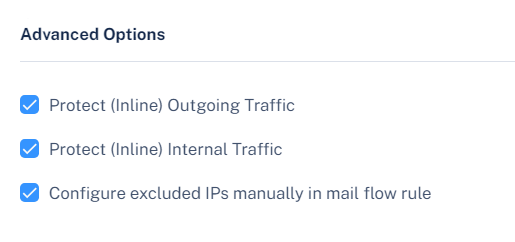
-
Click Save and Apply.
Note:-
If you enable Protect (Inline) protection mode for internal emails in a policy, it applies to all policies in Protect (Inline) mode, including the one you are editing.
-
In rare cases, as well as when customers onboard Microsoft 365 Mail in Manual Mode, some manual changes are required in your Microsoft 365 environment before enabling inline protection for internal emails. For more information, see Inline Protection for Internal Emails (Office 365 Mail) - Manual Configuration Required.
-
Inline Protection for Internal Emails (Office 365 Mail) - Manual Configuration Required
After selecting the Protect (Inline) Internal Traffic checkbox and saving the threat detection policy, a pop up appears stating that some manual configurations are required.
If that happens, follow these two steps:
-
Add a Mail Flow rule named Avanan.
-
Edit the Avanan DLP Outbound Connector and check the Retain internal Exchange email headers checkbox.
Only after completing these changes, Avanan protects the internal emails in Protect (inline) protection mode.
Fallback Workflows for Internal Traffic
In case Protect (Inline) protection for internal emails is not enabled, internal emails are inspected in Detect and Remediate mode.
As they share the policy with incoming emails, workflows defined for inline protection cannot be applied on the internal emails.
Therefore, for every inline workflow defined for incoming emails, these workflows are applied for internal traffic:
|
Threat Detection Policy Workflow for Incoming Emails |
Threat Detection Policy Workflow for Internal Emails |
Comments |
|---|---|---|
| Quarantine (Prevent (Inline) or Detect and Remediate protection mode) | Quarantine (Prevent (Inline) or Detect and Remediate protection mode) | N/A |
| Email is allowed. Deliver to Junk | Email is allowed. Deliver to Junk | N/A |
| Do nothing | Do nothing | N/A |
| Email is allowed, Header is added to the email | Do nothing | If you want the fallback workflow as Quarantine, contact Avanan Support. |
| User receives the email with a warning | User receives the email with a warning | N/A |
| Require end users to enter the password | Require end users to enter the password | Workflow relevant for Password Protected Attachments Protection. |
| Add [SPAM] to subject | Add [SPAM] to subject | N/A |
| Deliver with Smart Banners | Do nothing | N/A |