
Click-Time Protection Policy
To configure Click-Time Protection policy:
-
Navigate to Policy.
-
Click Add a New Policy Rule.
-
Select the desired SaaS application under Choose SaaS drop-down.
-
Select Click-Time Protection under Choose Security drop-down and click Next.
-
Choose Scope for the policy.
-
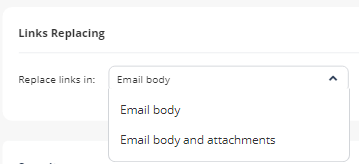
Under Links Replacing, choose where to replace the links for the email.
- Email body
- Email body and attachments
-
Under Severity, select the severity of the events generated by Click-Time Protection security engine.
- Auto
- Critical
- High
- Medium
- Low
- Lowest
-
Click Save and Apply.
Note:
For more details about workflow and additional settings, see Click-Time Protection.
Click-Time Protection Exceptions
For more information about Click-Time Protection, see Click-Time Protection Exceptions.