
Click-Time Protection Exceptions
Avanan allows administrators to override Avanan detections or prevent link rewriting by defining exceptions to the inspection on replaced links.
Administrators can add URLs and domains to these exceptions list:
-
Allow-list - Even if Avanan finds the website malicious, Avanan allows the user to access the website. However, Avanan replaces the link, and clicking on it is logged into the system.
-
Block-list - Even if Avanan finds the website benign, Avanan blocks the user from accessing it and shows it is blocked.
-
Ignore-list - Avanan does not replace the links to these URLs/domains. Therefore, Avanan does not monitor clicks on these links or track them.
Viewing Click-Time Protection Exceptions
To view the configured Allow-List or Block-List rules:
-
Access the Avanan Administrator Portal.
-
Go to Security Settings > Exceptions > Click-Time.
-
In the drop-down from the top of the page, select the require exception type (Allow-List or Block-List).
The page shows a table with all file type exceptions and the defined criteria.
Configure Click-Time Protection exceptions
-
Navigate to Security Settings > Exceptions > Click-Time.
-
From the drop-down in the top, select the exception type.
-
Allow-List
-
Block-List
-
-
To create an allow-list, click Create Allow-List.
-
To create a block-list, click Create Block-List
-
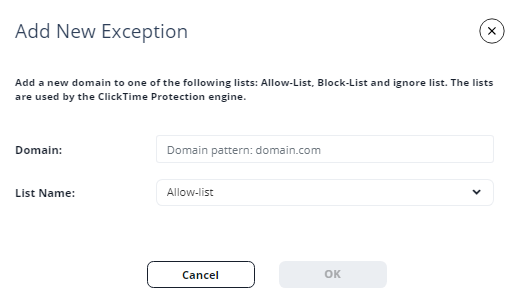
Under Domain, enter the required domain in the Domain pattern: domain.com format.
-
In the List Name drop-down, select the required exception type (Block-list, Allow-list, Ignore-list).
-
Click OK.
Link Shorteners and Re-Directions
Click-Time Protection exceptions apply only to the URLs written in the email and its attachments.
If an email contains a shortened link or a link that automatically redirects to one of the URLs/domains in the exception lists, the link in the email will not be excluded.However, these links will be re-written and inspected, and access to them will be enforced based on the inspection result and policy, as if they were not part of any exception list.
For example, if a domain domain.com is in the block list and the email contains the shortened link bit.ly/12345 that redirects to domain.com, the link will be re-written and inspected like any other link and users clicking on the link will not be automatically blocked from accessing the website.