
Webhook Parameters - Mapping Webhook Payload Fields
When configuring a webhook:
-
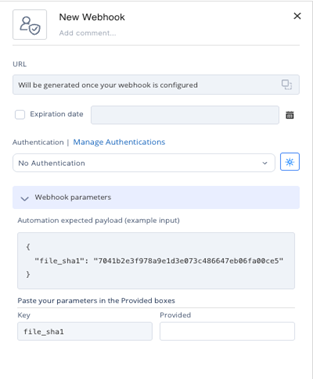
The automation's trigger step may include an Example Output, which defines the expected data structure for subsequent steps.
-
In rare cases, the webhook payload sent by the third-party system does not match the format expected by Playblocks.
-
Use Webhook Parameters to map fields from the incoming webhook payload to the fields defined in the Example Output:
 Note:
Note:If mapping is not defined, the system assumes identical field names as shown in the example output.
-
Mapping ensures that the automation receives the correct data in the correct format.
-
Example Scenario
-
The Example Output includes a field named file_sha1.
-
A later step in the automation relies on this field.
-
The third-party system sends a payload in these format:
{
              "data": {
              "sha1": "7041b2e3f978a9e1d3e073c486647eb06fa00ce5"
              }
              }
-
-
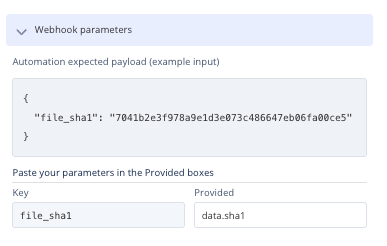
Since the incoming payload uses a different structure and field name, create a mapping so the automation receives the value in the expected file_sha1 field.
-
Steps to Create a Mapping
-
Go to Webhook Parameters in the webhook configuration.
-
Map the incoming field (data.sha1) to the expected field (file_sha1).
-