Syslog Integration

The administrator can set the dashboard to send Syslog events to a Syslog server. The Mobile Security dashboard must communicate to your Syslog server through your firewall.

To view the source IP addresses, see Appendix A - Mobile Security Communication Information.

  1. Go to Settings > Integrations and click +Add.
  2. Click Security Posture > Syslog.

    The Syslog window appears.
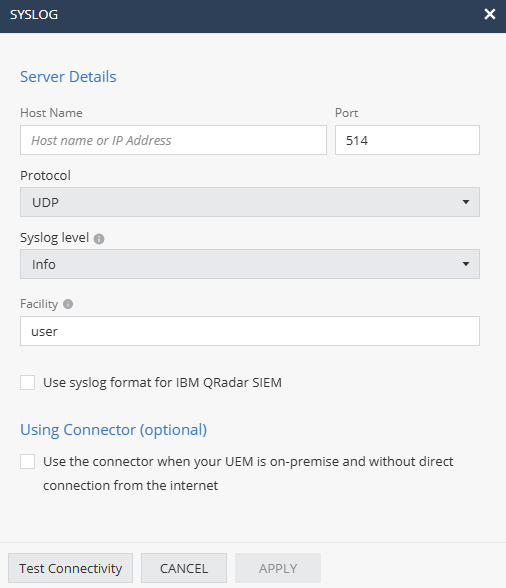
  3. Enter these settings.
    Setting Description
    Host Name Host name or IP Address of Syslog server
    Protocol UDP or TCP
    Port Port that the Syslog server is listening on.
    Syslog level

    Severity level of events to be sent to the server. Events with the selected severity level or higher will be sent.

    Supported values:

    • Info
    • Warn
    • Error
    • Debug
    Facility Type of program generating the log message. Messages from different facilities may be processed differently. Default value is user.
  4. If you are using IBM QRadar SIEM, select the Use syslog format for IBM QRadar SIEM checkbox to format log messages according to QRadar's syslog requirements.
  5. Click Apply.

    For more information on the structure of the Syslog event sent by Mobile Security, see Appendix B - Mobile Security Syslogs.