Managing Firewall Objects and Groups
Objects defined in Endpoint Security and stored in the object database, represent physical and virtual network components (such as Endpoint devices and servers), and logical components (such as IP address ranges). You can create new objects to be used in the policy.
Endpoint Security supports the object categories described below.
Hosts
A host can have multiple interfaces, but no routing takes place. It is an Endpoint device that receives traffic for itself through its interfaces. (In comparison, a Check Point Firewall routes traffic between its multiple interfaces). For example, if you have two unconnected networks that share a common Endpoint Security Management Server and a Log Server, configure the common server as a host object.
A host has no routing mechanism, it is not capable of IP forwarding, and cannot be used to implement Anti-Spoofing.
The Endpoint Security Management Server object is a host.
Enter these properties data to define a host
- Name - A name for the host. The name must start with a letter and can include capital and small letters, numbers and '_'. All other characters are prohibited
-
IPv4 and/or IPv6 addresses of the host you want to use.
-
Description (Optional) - A description of the host object.
Networks
A network is a group of IP addresses defined by a network address and a net mask. The net mask indicates the size of the network.
A Broadcast IP address is an IP address which is destined for all hosts on the specified network. If this address is included, the Broadcast IP address is considered as part of the network.
Enter these properties to define a network:
-
Name - A name for the network. The name must start with a letter and can include capital and small letters, numbers and '_'. All other characters are prohibited.
-
Network Address (IPv4) and Netmask (IPv4) of the network object you want to use.
or
Network Address (IPv6) and Prefix (IPv6) of the network object you want to use.
-
Description (optional)- A description of the network object.
Network Groups
A network group is a collection of hosts, networks, or other groups. The use of groups facilitates and simplifies network management. When you have the same set of objects which you want to use in different places in the Rule Base, you can create a group to include such set of objects and reuse it. Modifications are applied to the group instead of to each member of the group.
Groups are also used where Endpoint Security lets you select only one object, but you need to work with more than one.
Enter these properties to define a network group object:
-
Name - A name for the network object. The name must start with a letter and can include capital and small letters, numbers and '_'. All other characters are prohibited
-
Click the + icon to add the required objects to your group.
-
Description (Optional) - A description of the group.
Domains and Domain Groups
A Domain object lets you define a host or a DNS domain by its name only. It is not necessary to have the IP address of the site. You can use the Domain object in the source and destination columns of the Firewall Policy.
Enter these properties to define a Domain:
-
Name - A name for the Domain. The name must start with a letter and can include capital and small letters, numbers and '_'. All other characters are prohibited.
-
Host name - Use the Fully Qualified Domain Name (FQDN).
Sub-sites must be added separately, if you want to apply the rule to them as well. Wildcard symbols like * are not allowed. Non-Qualified Domain Names are not supported.
Note:The DNS resolution is executed only once the policy is applied, or following a reboot.
-
Description (Optional) - A description of the Domain or Domain group object.
Enter these properties to define a Domain group:
-
Name - A name for the Domain. The name must start with a letter and can include capital and small letters, numbers and '_'. All other characters are prohibited.
-
Click the + icon to add the required Domains to the Domain group.
-
Description - A description of the Domain group
Address Ranges
An address range is a range of IP addresses on the network, defined by the lowest and the highest IP addresses. Use an Address Range object when you cannot define a range of IP addresses by a network IP and a net mask. The Address Range objects are also necessary for the implementation of NAT and VPN.
Enter these properties to define an address range object:
-
Name
-
From IP address (IPv4) - To IP address (IPv4) - First and last IPv4 addresses of the range.
or
From IP address (IPv6) - To IP address (IPv6) - First and last IPv6 addresses of the range.
-
Description (Optional) - A description of the address range.
Security Zones
Services and Service Groups
Data transmission services, such as UDP and TCP.
The Endpoint identifies (matches) a service according to IP protocol, TCP and UDP port number, and protocol signature.
Creating Objects
Create objects for areas that programs must have access to, or areas that programs must be prevented from accessing.
Configure objects for each policy or define objects before you create a policy. After you configure an object, you can use it again in other policies.
-
In the Access view, go to Manage > Manage Firewall Objects > Manage Objects and Groups or, in the in the Access view > go to Edit Inbound/Outbound Rule Base).
The Manage Objects and Groups window opens.
-
Click this icon:

-
Configure the relevant properties and click OK.
When you create a new network object, the name must start with a letter and can include capital and small letters, numbers and "_ / -". All other characters are prohibited.
Checking Object Usage
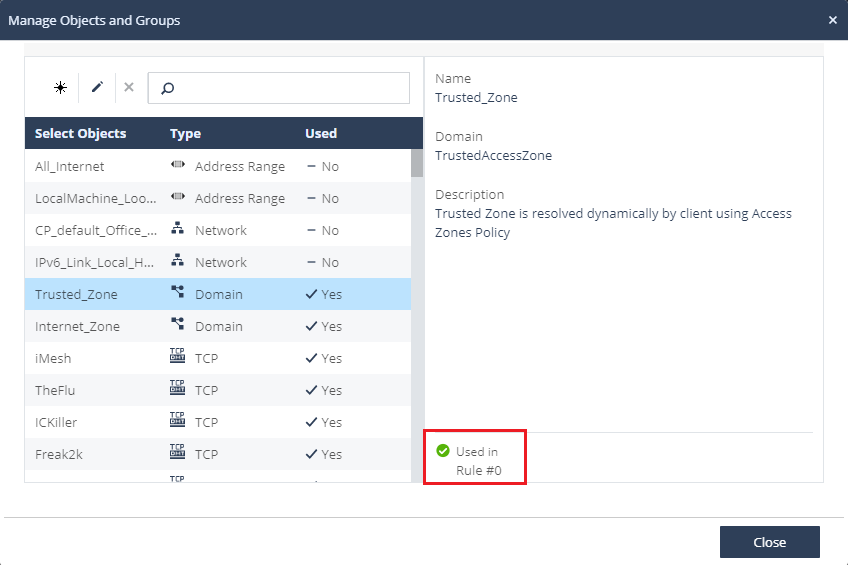
You can check in which rule each object is used.
-
In the Access view, go to Manage > Manage Firewall Objects > Manage Objects and Groups.
-
Select the object and look at the right corner of the window to see the rules in which the object is used.
For example: