
Policy Rule Components
The Policy Rule Base consists of these parts:
| Column | Description |
|---|---|
|
Rule Number |
The sequence of the rules is important because the first rule that matches traffic according to the protected scope is applied. |
|
Rule Name |
Give the rule a descriptive name. |
|
Applied to |
The protected scope to which the rule applies. |
|
Full Disk Encryption |
The configurations that apply to data encryption. |
Policy Toolbar Options
The Policy toolbar includes these options:
| To do this | Click this |
|---|---|
| Create a new rule |
|
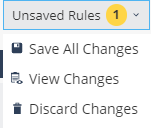
| Save, view, or discard changes |
|
| Duplicate a rule |
|
| Install Policy |
|
| Search for entity |
|
| Delete a rule |
|






For Crypto-Shredding a computer, see sk179911.
Disabling Full Disk Encryption
-
Go to the Policy view.
-
Click Data Protection > General.
-
In the Capabilities and Exclusions pane, click Full Disk Encryption.
-
In Enable Pre-boot, select OFF.
-
Smart
-
Legacy
-
Off
-
-
Click Save & Install.