
DLP Subject Regular Expression (Regex)
By default, Avanan matches emails to DLP policy rules based on the data types detected in them. However, you can use regular expressions to match emails from the email subject.
This type of matching helps you to detect sensitive emails from the email subject and allows you to trigger specific workflow. Therefore, emails with a defined subject pattern will match the DLP policy rule regardless of the data types they include.
To add a regular expression condition to a DLP policy:
- Go to Policy.
- To add the regular expression to an existing DLP policy, click the policy and continue from step 6.
- To create a new DLP policy, click Create New Policy Rule.
- From the Choose SaaS drop-down, select the desired SaaS application.
- From the Choose Security drop-down, select DLP and click Next.
- In the Protection mode section, select Prevent (Inline).
-
Select the Scope of the policy.
- Select email direction as Outbound.
- Under Senders, select the Specific Users and Groups the policy applies to.
-
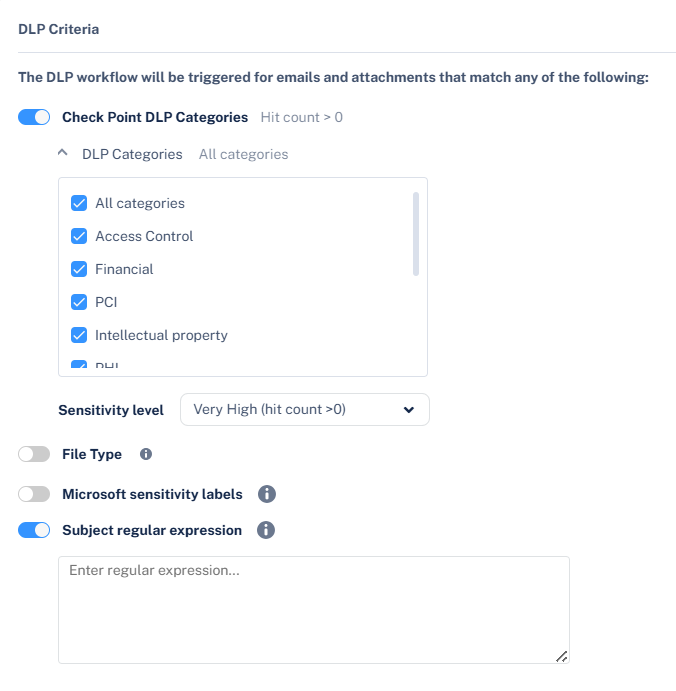
In the DLP Criteria section, do these.
-
Enable Subject regular expression toggle button and enter the regular expression. See Subject Regular Expressions Syntax.
-
Enable Subject regular expression toggle button and enter the regular expression. See Subject Regular Expressions Syntax.
- Click Save and Apply.