
Reports
On the Reports page, you can download the reports in the pdf format:
-
Threat Analysis Report - Shows the latest security events.
-
Threat Analysis Report Anonymized - Shows the latest security events without specific user names.
-
High Risks Cyber Attack Report - Shows the analysis of all the Endpoint Security events by statuses of the attack pillars.
-
Web Activity Checkup - Shows the web activity in the organization.
-
Threat Emulation Report - Shows a report about scanned and malicious files.
-
Threat Extraction Report - Shows the insights on the downloaded files.
-
Software Deployment Report - Shows the deployment status in the organization.
-
Policies Report - Shows policies status.
-
Vulnerability Management -Shows the detected vulnerabilities.
Note:Available only to customer subscribed to this feature and with server version R81.10.x and higher.
-
Posture Management - Shows Vulnerability Management and patches information.
Note:Available only to customer subscribed to this feature and with server version R81.10.x and higher.
-
Operational Report - Shows the operational status of the endpoints.
-
Compliance Report - Shows the compliance status in the organization.
-
Check Point Cyber Security Report - Shows the latest security trends as per Check Point.
Generate Report
-
Go to Overview > Reports > Generate Report.
-
Select a report, click
 and select Export Report.
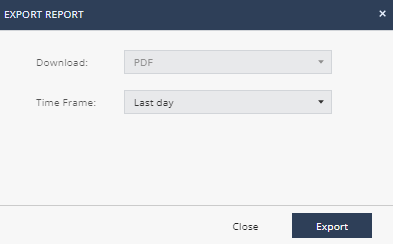
The Export Report window appears.
-
In the Time Frame list, select Last day, Last 7 days, or Last 30 days.
-
Click Export.