Step 3: Updating Inbound Gateway
- From the left navigation panel, click Apps > Google Workspace > Gmail.
- Scroll down and click Spam, Phishing and Malware.
- Click Inbound gateway.
- Select Enable checkbox.
-
In the Gateway IPs section, click Add and enter the IP address or IP address range relevant to your Avanan tenant (account) region.
For the list of supported IP addresses, see IP Addresses Supported Per Region.
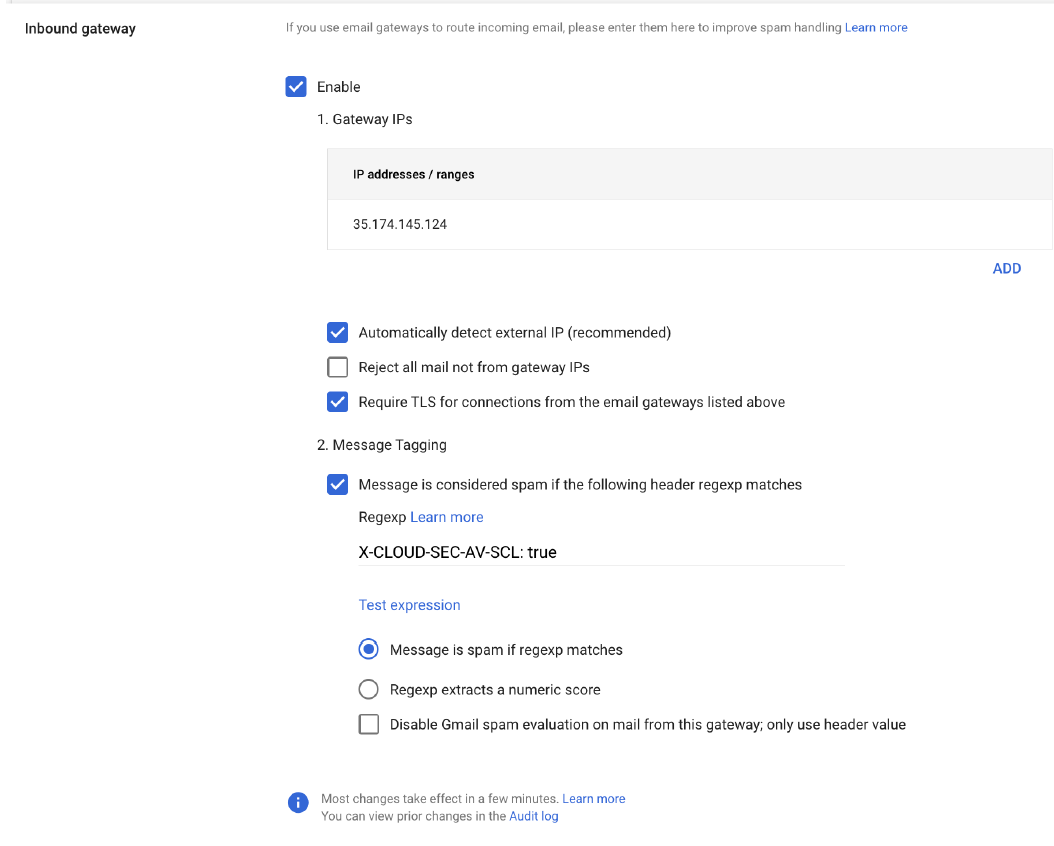
- Select Automatically detect external IP (recommended) checkbox.
- Select Require TLS for connections from the email gateways listed above checkbox.
- In the Message Tagging section, select Message is considered spam if the following header regexp matches and enter X-CLOUD-SEC-AV-SCL: true.
- In the Test expression section, select Message is spam if regexp matches option.
- Click Save.