
Configuring the Available End User Actions in the Daily Quarantine Digest
The actions available to end users in the Daily Quarantine Report (Digest) depend on how the email was quarantined and the configuration defined in policy.
-
Emails Quarantined by Avanan - The permitted actions are defined in the relevant policies.
For example, if the Threat Detection policy is set to allow users to request a restore for phishing emails, the Request restore action appears next to quarantined phishing emails in the digest.
-
Emails Quarantined by Microsoft - Users can perform actions based on Microsoft's detection settings.
To configure these permissions:
-
Go to Security Settings > User Interaction > Quarantine.
-
In the End User Permissions section, click Emails quarantined by Microsoft > End-user permitted actions.
The default settings are:
-
Malware - Can request a restore (admin needs to approve)
-
High Confidence Phishing - Can request a restore (admin needs to approve)
-
Phishing - Can request a restore (admin needs to approve)
-
High Confidence Spam - Can restore on their own
-
Spam - Can restore on their own
-
Bulk - Can restore
-
Data Loss Prevention - Can restore
-
Transport Rule - Can restore
-
-
-
Emails Flagged as Spam - The Trust sender action appears if the Threat Detection policy is configured to allow users to trust senders. See Trusted Senders.
This behavior applies regardless of whether the email is quarantined or delivered to the Junk folder.
-
Preview Email - This action allows users to preview quarantined emails in their End-User Portal. See End-User Portal (Avanan Portal).
This action appears if the Include a Preview link next to each quarantined email checkbox is enabled under Security Settings > User Interaction > Quarantine > End User Quarantine Report (Digest) > Content.
Note:For this action to work, ensure the End-User Portal is enabled for your users.
-
Restrict All Actions to the End‐User Portal - When you enable the Preview Email action, you can also enable Hide action links when the preview link is shown under Security Settings > User Interaction > Quarantine > End User Quarantine Report (Digest) > Content.
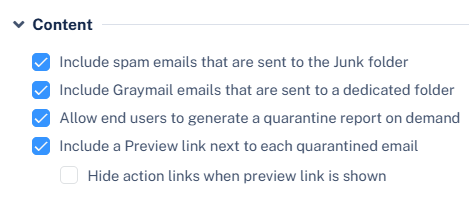
This ensures that users interact with quarantined emails only through the End‐User Portal.
-
Required Authentication - In some cases, users may need to authenticate to perform actions from the digest. See Authentication for Email Notifications.