
Emails Included in the Quarantine Digest
The End-User Quarantine Report (Digest) includes emails that were quarantined or sent to the Junk folder, depending on your configuration.
In some cases, if administrators or end users have configured advanced rules that move Junk emails to other folders, emails shown in the digest as Junk may no longer be present in the Junk folder.
An email appears in the digest if the following conditions are met:
-
Emails Quarantined by Avanan
Included if the policy allows the end user to restore the email or request its restoration.
-
Emails Quarantined by Microsoft
Included if:
-
The Show emails quarantined by Microsoft checkbox is enabled under Security Settings > User Interaction > Quarantine > End User Permissions.

-
The email detection workflow allows the end user to restore the email or request its restoration.
-
-
Block-Listed Emails
Included if the Include block-listed emails checkbox is enabled under Security Settings > User Interaction > Quarantine > End User Permissions > Block Listed Emails.

-
Spam Emails Delivered to the Junk Folder
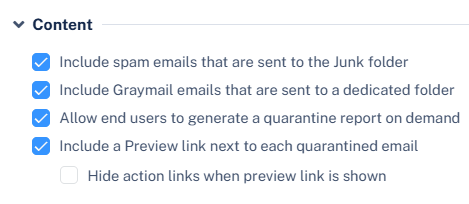
Included if the Include spam emails that are sent to the Junk folder checkbox is enabled under Security Settings > User Interaction > Quarantine > End User Quarantine Report (Digest) > Content.
-
Graymail Emails Delivered to a Dedicated Folder
Included if the Include Graymail emails that are sent to a dedicated folder checkbox is enabled under Security Settings > User Interaction > Quarantine > End User Quarantine Report (Digest) > Content. See Graymail Workflows.
-
Reporting Time Period
Includes only emails that are received within the configured digest reporting time period. See Scheduling and Coverage Timeframe for the Quarantine Digest.