
Configuring Misdirected Email Prevention
The Outlook Add-In performs real-time checks during user actions such as Send, Reply, Reply All, and Forward. When a potential risk is detected, the system displays an on-screen warning to the user before the email is sent.
To view the supported devices for the Outlook Add-In, see Outlook Add-In - Supported Outlook Types and Platform.
Misdirected Email Prevention requires a DLP license (either the DLP add-on or the Complete Package).
To configure misdirected email notifications:
-
Access the Avanan Administrator Portal.
-
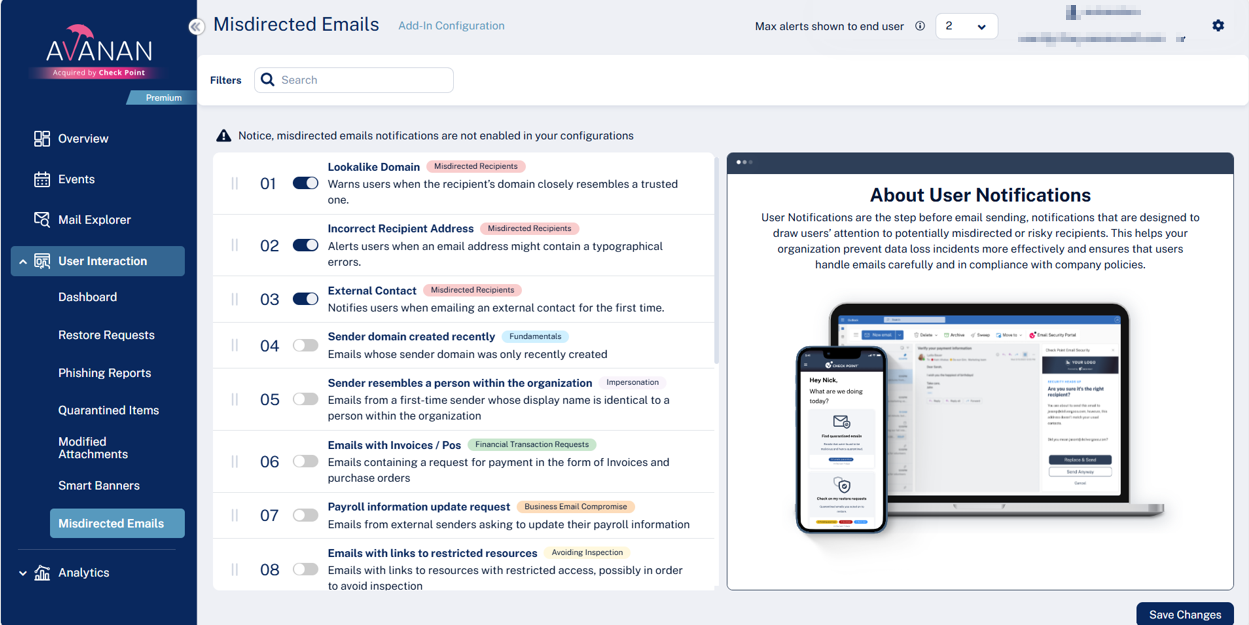
From the left navigation panel, go to User Interaction > Misdirected Emails.
-
Enable the required categories toggle buttons and click Save Changes. See Misdirected Emails Categories.
Responding to Misdirected Email Warnings in Outlook - End-User Experience
If an administrator has configured the misdirected email notifications in the Outlook Add-In, it performs real-time checks during actions such as Send, Reply, Reply All, and Forward.
When a potential risk is detected, an on-screen warning banner appears in Outlook before any action, allowing a user to review the details.
For more information about the permissions requested during Outlook Add-In sign-in, see Required Permissions.
To respond to a misdirected email:
When the warning banner appears, review the email details shown in the alert.
-
If the information entered is correct, select Send Anyway to proceed.
-
If the suggested correction is correct, select Replace & Send to apply the change and send the email.
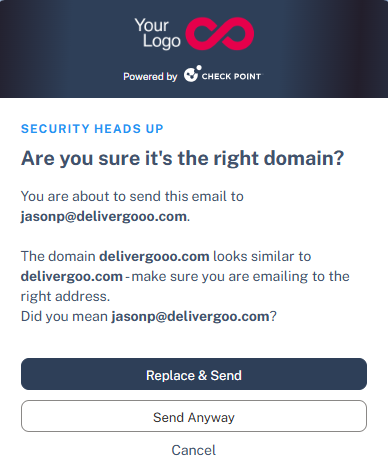
This ensures emails are sent to the intended recipients while reducing the risk of accidental data exposure.
Outlook Add-In Processing Message During Email Send
In some cases, when the user clicks Send, Outlook may display the following message:
One or more add-ins couldn't complete processing your email.
This issue occurs when the user performs another action that moves them away from the message being sent before the Outlook Add-In finishes processing the email.
Examples include:
-
Clicking another email
-
Switching to a different Outlook folder
-
Navigating away from the compose window
-
Changing focus before the add-in completes its processing
When this occurs, Outlook interrupts the send process and prompts the user to select an action, such as Wait or Save as Draft.
Recommended User Action:
The user should click Wait and allow the Avanan Outlook Add-In to complete processing the email before continuing to work in Outlook.
Misdirected Emails Categories
| Category and Name | Description | Enabled by Default? |
|---|---|---|
|
Misdirected Recipients |
||
|
Incorrect Recipient Address |
Notifies users when emailing an external contact for the first time. |
Yes |
|
Lookalike Domain |
Warns users when the recipient's domain closely resembles a trusted domain. |
Yes |
|
External Contact |
Alerts users when an email address may contain typographical errors. |
No |
|
Incoming Email from External Sender |
Displays alerts for incoming emails (label/description placeholder shown) from external senders. |
No |
|
Fundamentals |
||
|
Sender Domain Created Recently |
Detects emails whose sender domain was created recently. |
No |
|
Reply-to Domain Recently Created |
Detects incoming emails with a reply-to domain that was created recently and differs from the sender domain. |
No |
|
Sender Name Differs from Address |
Detects emails where the display name significantly differs from the actual email address. |
No |
|
Sender SPF Failed |
Detects emails that fail Sender Policy Framework (SPF) authentication. |
No |
|
Impersonation |
||
|
Sender Resembles Internal Employee |
Detects emails from a first-time sender whose display name matches an employee within the organization. |
No |
|
First-time Sender |
Detects emails from senders with whom the recipient has never communicated. |
No |
| Business Email Compromise | ||
| Payroll Information Update Request |
Detects emails requesting payroll information updates from external senders. |
No |
|
Invoice from a New Vendor |
Detects invoices received from vendors with no prior communication history. |
No |
|
Sender Resembles Contact |
Detects email senders that closely resemble, but are not identical to, known contacts. |
No |
|
Request to Update Payment Details |
Detects vendor requests to change payment details. |
No |
|
Financial Transaction Requests |
||
|
Emails with Invoices / POs |
Detects emails that contain payment requests such as invoices or purchase orders. |
No |
| Payment Request via Payment Service | Detects payment requests via third-party services (for example, PayPal or Venmo). | No |
|
Avoiding Inspection |
||
|
Emails with Links to Restricted Resources |
Detects emails that contain links to restricted-access resources. |
No |
|
Emails Appearing to Be from an E-Sign Service |
Detects emails that contain potentially malicious e-signature links. |
No |