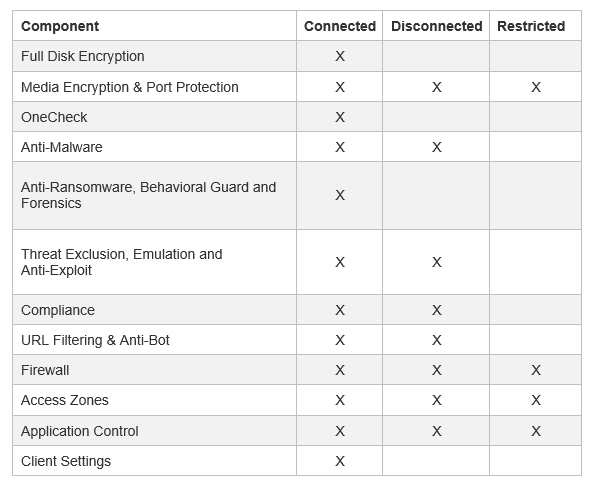
Connected, Disconnected and Restricted Rules
Endpoint Security can enforce policy rules on computers and users based on their connection and compliance state.
When you create a policy rule, you select the connection and compliance states for which the rule is enforced. You can define rules with these states:
-
Connected state rule is enforced when a compliant endpoint computer has a connection to the Endpoint Security Management Server. This is the default rule for a component policy. It applies if there is no rule for the Disconnected or Restricted states of the component. All components have a Connected Rule.
-
Disconnected state rule is enforced when an endpoint cannot connect with its management server either the on-premises Endpoint Security Management Server or the Endpoint Security (EPMaaS). In this state, the client is temporarily disconnected from management and continues to enforce the last locally cached policy.
Disconnection can happen for several reasons, including:
-
Loss of internet connectivity
-
Network restrictions such as firewalls, proxy rules, or VPN configurations
-
Captive portals or authentication gateways
-
Scenarios where the device is connected to internal resources but cannot reach the management service
Use the Disconnected state rule to define how endpoints behave when they are unable to access their management service.
-
-
Restricted state rule is enforced when an endpoint computer is not in compliance with the enterprise security requirements. In this state, you usually choose to prevent users from accessing some, if not all, network resources. You can define a Restricted policy for only some of the Endpoint Security components.