
Service Management
You can use the Service Management page to view the overall status of your accounts. To view the Service Management page, click Overview > MSSP View > Services > Service Management.
Accounts Info
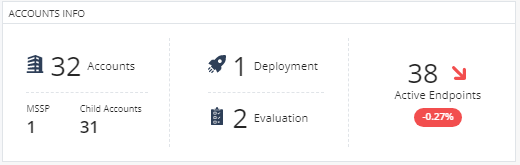
The Accounts Info widget shows:
-
Total number of accounts (includes MSSP accounts and child accounts).
-
Number of deployed accounts (accounts with valid license).
Click Deployment to view the deployed accounts in the Account Details Table.
-
Number of accounts under evaluation (accounts with evaluation license).
Click Evaluation to view the accounts under evaluation in the Account Details Table.
-
Number of active endpoints. It also shows the change in the number of active endpoints by percentage in the last 24 hours.
Issues by Accounts
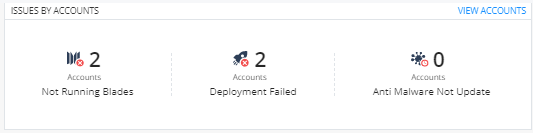
The Issues by Accounts widget shows the:
-
Number of accounts with endpoints with blades that are not running or are inactive in the Endpoint Security client.
-
Number of accounts with endpoints where Endpoint Security client deployment failed.
-
Number of accounts with endpoints where the Anti-Malware signature is not updated in the last 72 hours.
To view more information, click View Accounts. A new page appears that shows the details of issues in a table.
| Item | Description |
|---|---|
| Search | Enter the account name to search. |
 Toggle Filters Toggle Filters |
Opens the Filters widget. Specify the filter criteria. |
| Account Name | Name of the account. |
| Protected Endpoints | Number of endpoints protected. |
| Failed | Number of failed Endpoint Security client deployments. |
| On Over 72h Ago | Number of accounts whose last Anti-Malware signature update was more than 72 hours ago. |
| Not Running Blades | Number of blades that are not running on the Endpoint Security client. |
To export the issues to an Excel file, click Export to CSV.
Service Status
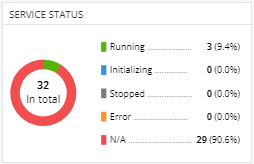
The Service Status widget shows the service status of the accounts:
-
Running
-
Initializing
-
Stopped
-
Error
-
N/A
To sort the accounts by status, click Status. For more details, see Account Details Table.
Hosting Sites
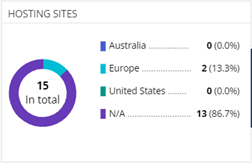
The Hosting Sites widget shows the number of accounts residing in different data regions.
Account Details Table
The Account Details table shows the details of the account.
|
Item |
Description |
|---|---|
|
|
Create a new service (a new Endpoint Security Management Server). |
|
|
Starts the service for the account selected in the table. |
|
|
Restarts the service for the accounts selected in the table. |
|
Actions |
Perform these actions:
|
|
Search |
Enter the account name to search. |
|
|
Opens the Filters widget. Specify the filter criteria. |
|
Account Name |
Name of the account. |
|
Service Status |
Service status of the accounts:
|
|
Purpose |
Purpose of the child account:
|
|
Connection Token |
Token used for the connection. The token is automatically generated when the service is created. You can use this token to connect to the tenant from the SmartConsole. |
|
Hosting Site |
Data region where the account is hosted. |
|
Launch Time |
Date and time the service was created. |
 Create Service
 Start
Start Restart