You can export events from the Logs table to a CSV file or to a JSON file.
In the Logs window, click Options > Export.
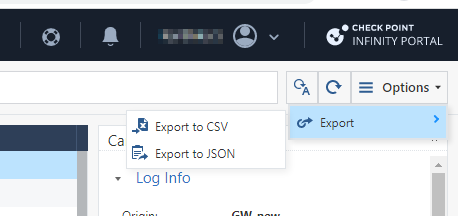
Select one of these output file formats.
Export to CSV
Export to JSON
Enter the information for these fields.
From How many logs to export list, select the number of logs you want to export.
In Exported Columns, select whether to export event data from Visible Columns or from All Columns.
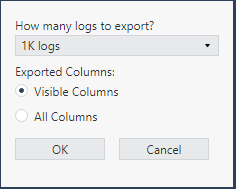
Click OK.
For CSV output, system generates an Excel sheet with the file name format: Events_Logs_Date_Time.xls. For JSON output, system generates a json file with name format: Events_Logs_Date_Time.json. Example, Events_Logs_Oct_17_2022_01_48_24_PM.