
CloudGuard
In the CloudGuard tab, you can view the CloudGuard information for the asset.

- The CloudGuard tab is displayed only for Management assets and not for Gateways.
-
The widgets displayed in the CloudGuard tab depend on CloudGuard management components (CME, Controller, Central License) on the Management Server.
CME

The CME widget displays:
-
Status - Status of the Cloud Management Extension (CME).
-
Take Version - CME Take version
-
Auto Upgrade Mode - Specifies whether Auto Upgrade Mode is enabled for CME.
CME Accounts Status
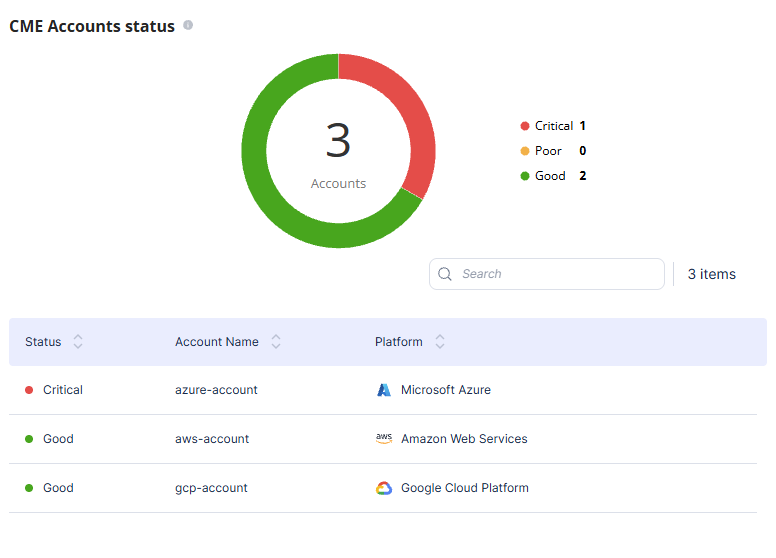
The CME Accounts status widget displays:
-
A pie chart that displays the total number of CME accounts and their health status.
-
A table with health status of each CME account and the cloud provider (platform) associated with it.
Controller

The Controller widget displays:
-
Status - Status of the CloudGuard Controller.
-
Take Version - CloudGuard Controller Take version
-
Auto Upgrade Mode - Specifies whether Auto Upgrade Mode is enabled for CloudGuard Controller.
Scale Events

The Scale Events widget displays the scale-in and scale-out events over time:
-
When the graph goes up, it indicates a scale‐out event, where gateways are added to the Autoscaling Group.
-
When the graph goes down, it indicates a scale‐in event, where gateways are removed from the Autoscaling Group.
You can filter the widget to view:
-
All scale events
-
Top auto-scale events
License Utilization
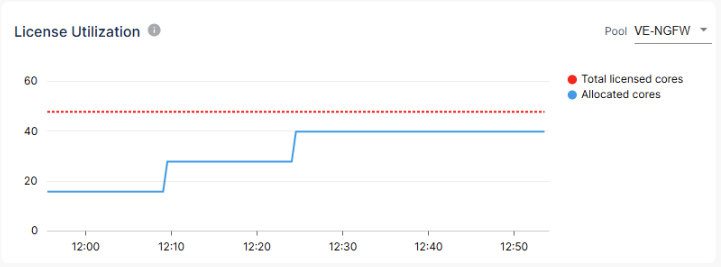
The License Utilization widget displays the number of allocated license cores over time compared to the total cores available in the license pool. You can select the license pool from the list at the top-right corner.