What is the Quarantine Folder

The Quarantine folder stores quarantine malware-infected or sensitive files from OneDrive. It quarantines files from all users and places them in a single predefined quarantine folder for the entire organization.

You can configure the Threat Detection policy and DLP policy to quarantine only malware while sending sensitive files to the end user's Vault.

Note:
  • The Quarantine folder can be stored in your organization's OneDrive or in the Avanan cloud in the region associated with your organization's Avanan account.

  • End users do not have access to this folder.

To customize the Quarantine folder:

  1. Go to Security Settings > SaaS Applications.
  2. Click Configure for Office 365 OneDrive.
  3. Go to Quarantined Files section.
  4. In the Store quarantined files in section, select where you want to store the quarantined files.
    • Check Point - Stores the quarantined files in the Avanan cloud in the region associated with your organization's Avanan account.

    • Company's OneDrive - Stores the quarantined files in a Quarantine folder located in your organization's OneDrive account.
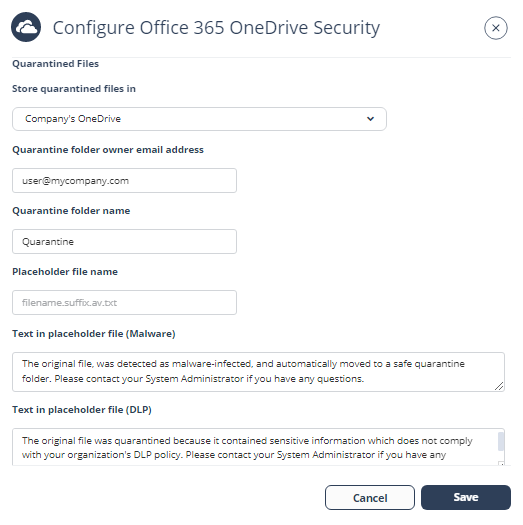
  5. If you selected Company's OneDrive in the previous step, enter the required details for the quarantine folder.
    • In the Quarantine folder owner email address field, enter the required email address.

      Note:

      Ensure that the OneDrive account for the provided email address.

    • In the Quarantine folder name field, enter the required folder name.

      Note:

      The system creates a Quarantine folder with the specified name in the root directory of the given email address.

  6. (Optional) To customize the content of the file that replaces the quarantined malicious file in its original folder, enter the text in the Text in placeholder file (Malware) field.
  7. (Optional) To customize the content of the file that replaces the quarantined sensitive file in its original folder, enter the text in the Text in placeholder file (DLP) field.
  8. Click Save.